> ## Documentation Index
> Fetch the complete documentation index at: https://infisical-devin-1781641701-docs-github-pat-fine-grained.mintlify.site/llms.txt
> Use this file to discover all available pages before exploring further.
# AWS Parameter Store Sync
> Learn how to configure an AWS Parameter Store Sync for Infisical.
**Prerequisites:**
* Set up and add secrets to [Infisical Cloud](https://app.infisical.com)
* Create an [AWS Connection](/integrations/app-connections/aws) with the required **Secret Sync** permissions
* Ensure your network security policies allow incoming requests from Infisical to this secret sync provider, if network restrictions apply.
For workflows involving large amounts of secrets or frequent syncs, we recommend increasing your [AWS Parameter Store throughput quota](https://docs.aws.amazon.com/systems-manager/latest/userguide/parameter-store-throughput.html) to avoid rate limiting.
1. Navigate to **Project** > **Integrations** and select the **Secret Syncs** tab. Click on the **Add Sync** button.
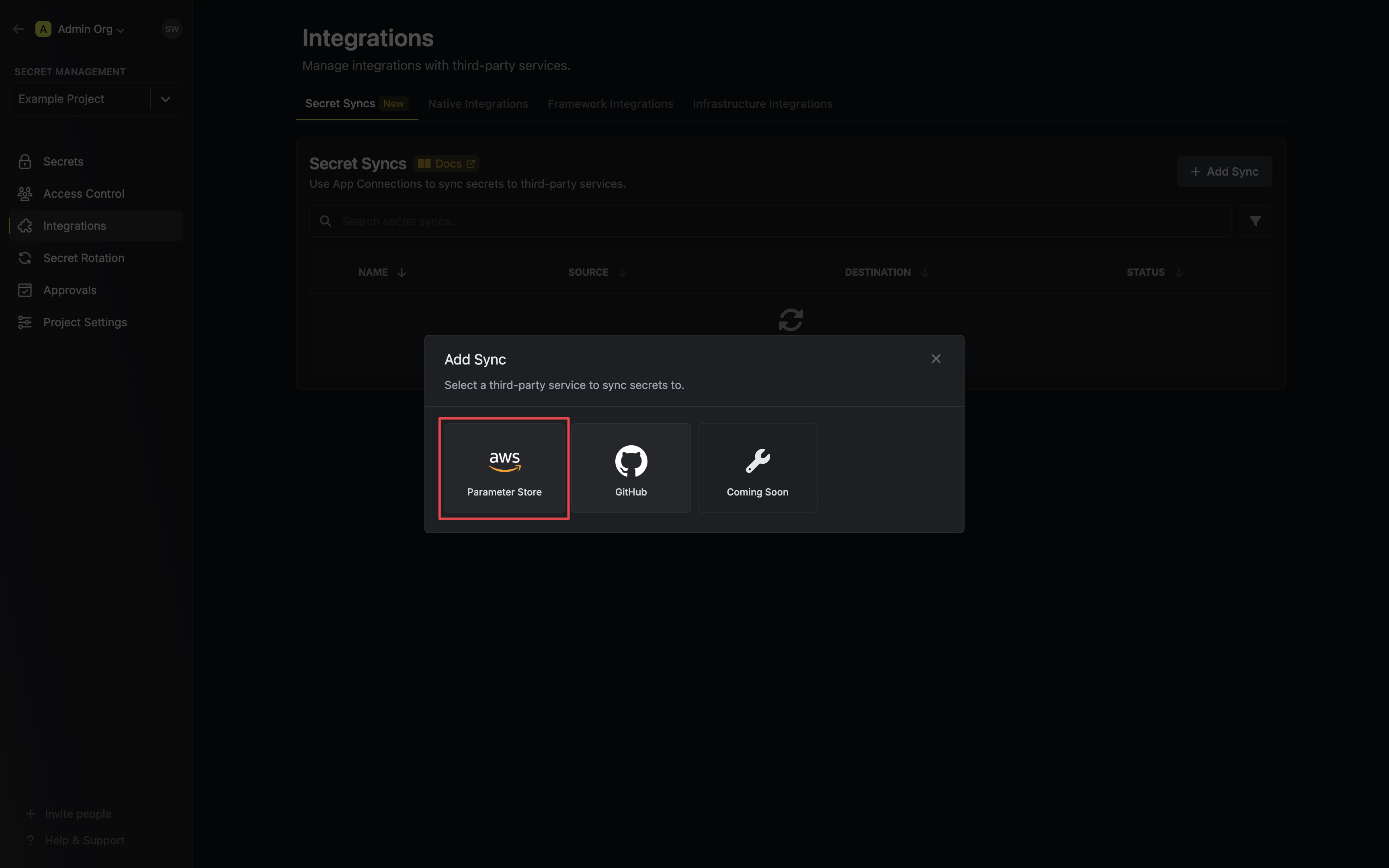
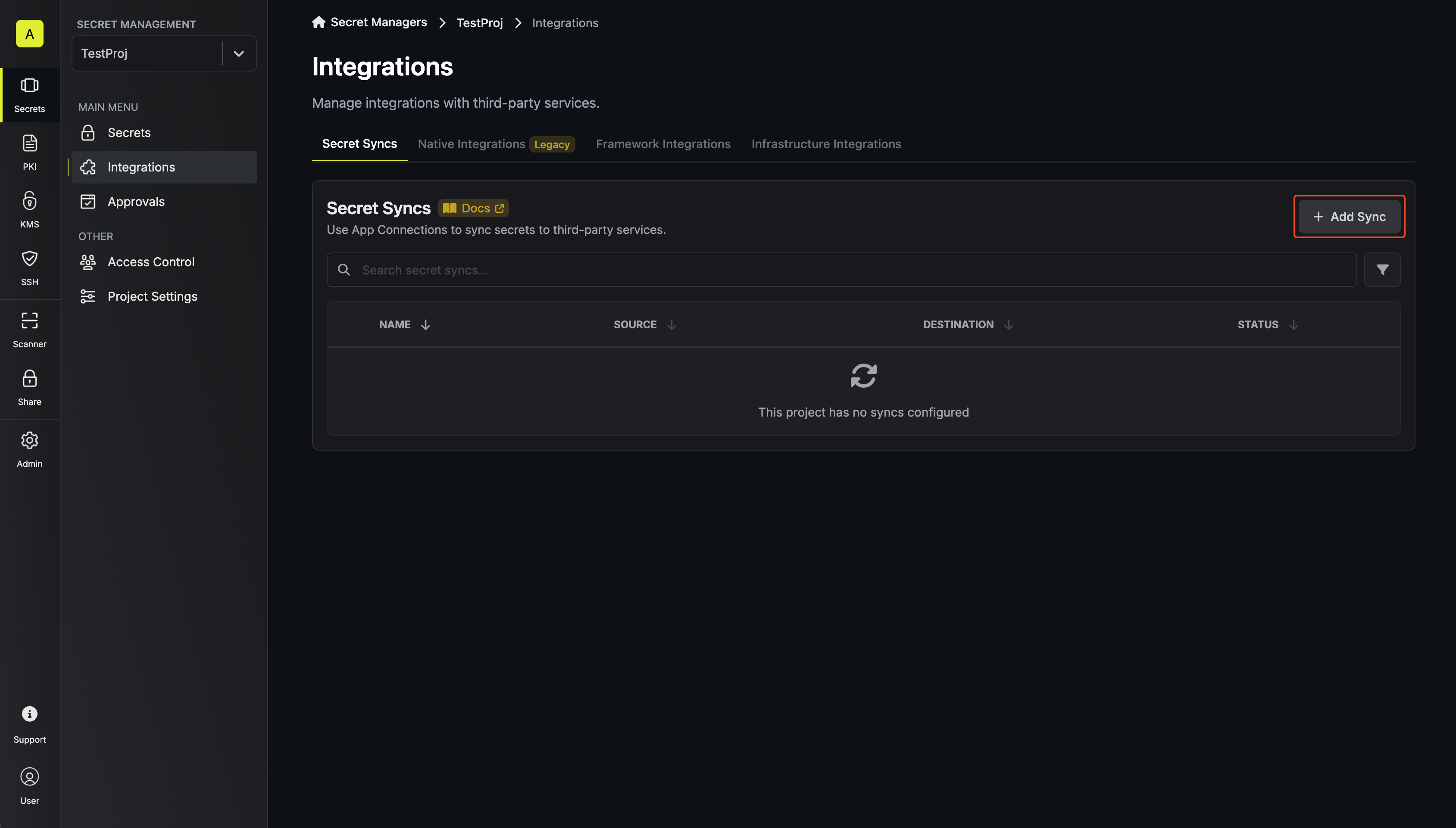 2. Select the **AWS Parameter Store** option.
 3. Configure the **Source** from where secrets should be retrieved, then click **Next**.
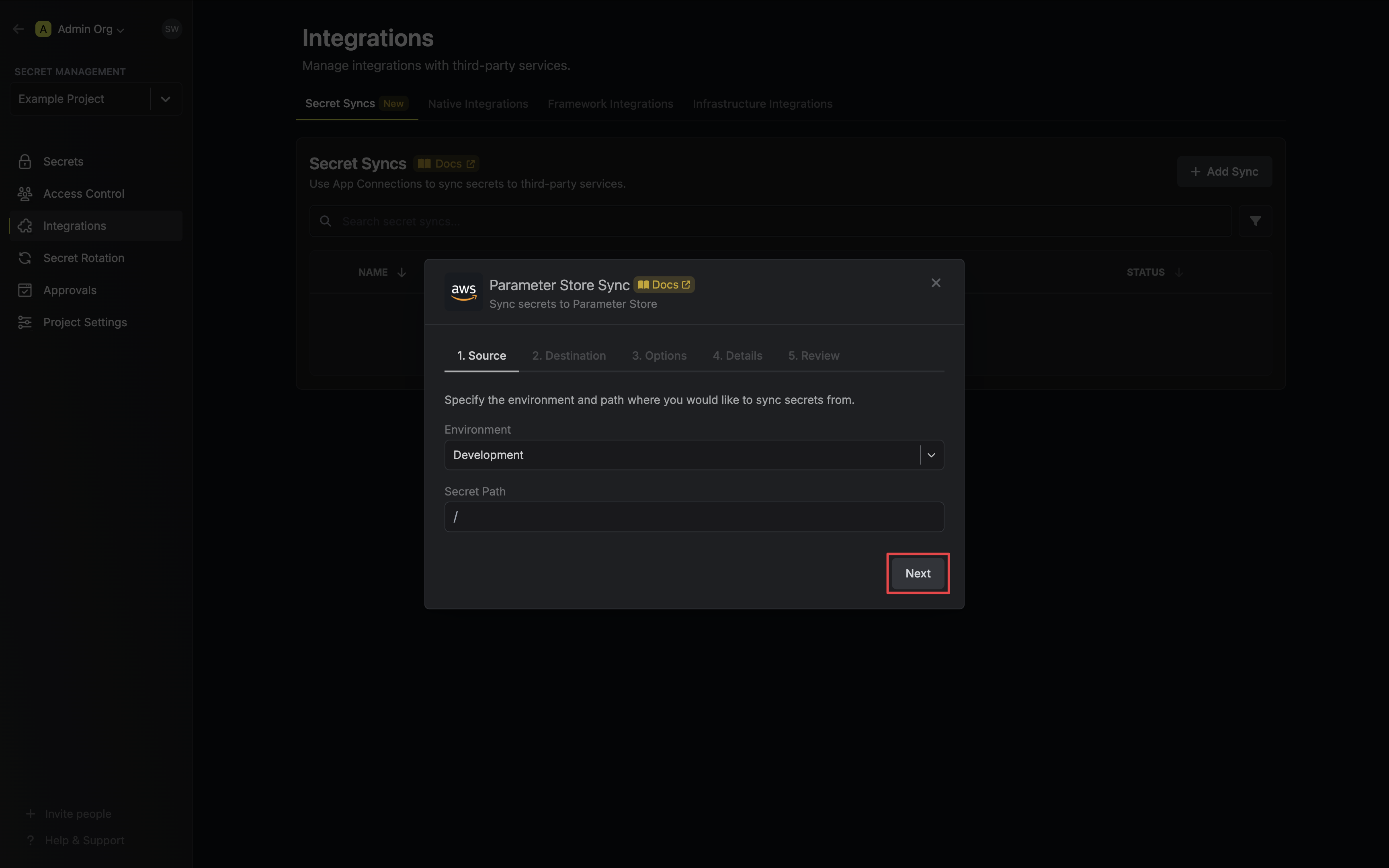 * **Environment**: The project environment to retrieve secrets from.
* **Secret Path**: The folder path to retrieve secrets from.
If you need to sync secrets from multiple folder locations, check out [secret imports](/documentation/platform/secret-reference#secret-imports).
4. Configure the **Destination** to where secrets should be deployed, then click **Next**.
* **Environment**: The project environment to retrieve secrets from.
* **Secret Path**: The folder path to retrieve secrets from.
If you need to sync secrets from multiple folder locations, check out [secret imports](/documentation/platform/secret-reference#secret-imports).
4. Configure the **Destination** to where secrets should be deployed, then click **Next**.
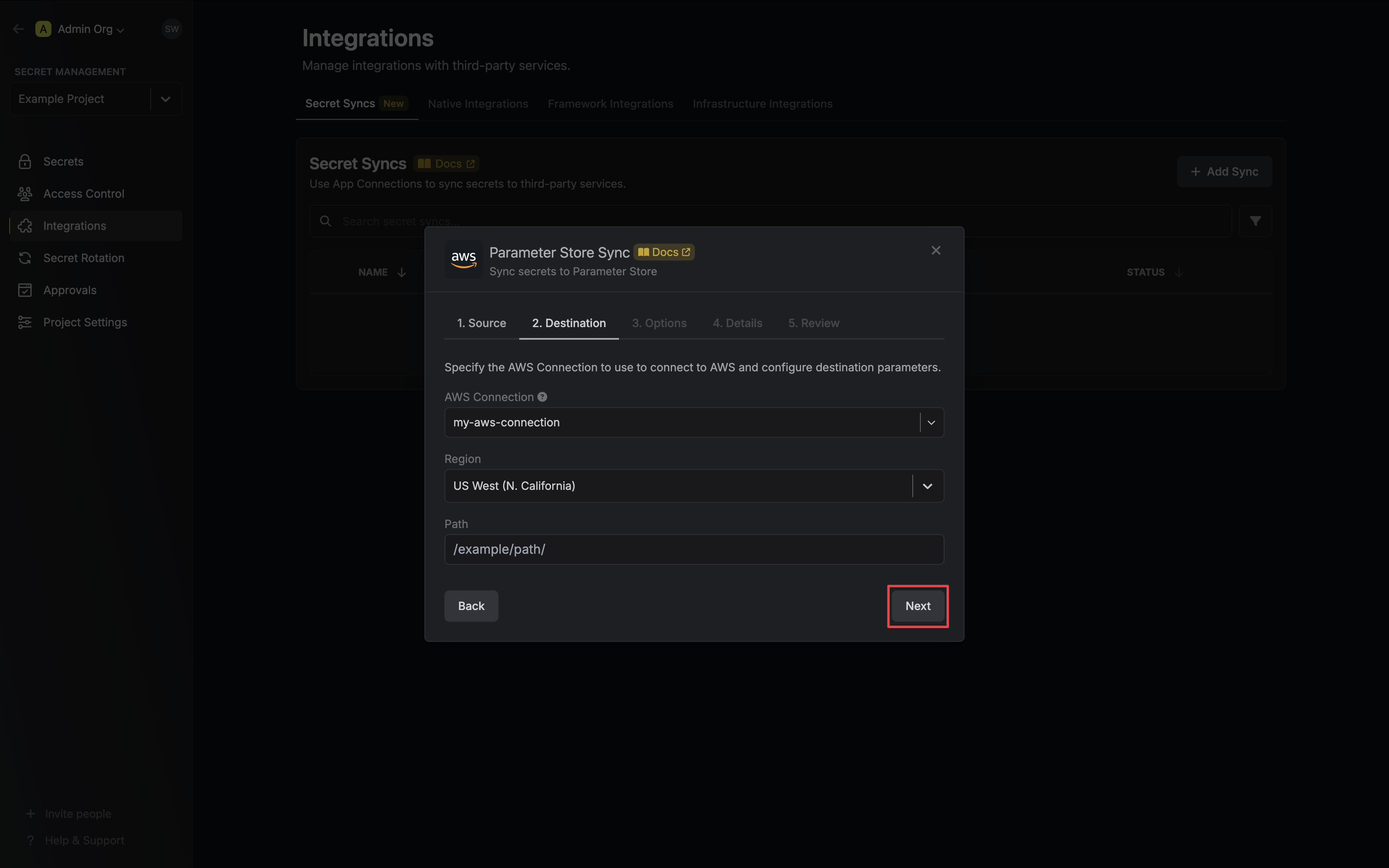 * **AWS Connection**: The AWS Connection to authenticate with.
* **Region**: The AWS region to deploy secrets to.
* **Path**: The AWS Parameter Store path to deploy secrets to.
5. Configure the **Sync Options** to specify how secrets should be synced, then click **Next**.
* **AWS Connection**: The AWS Connection to authenticate with.
* **Region**: The AWS region to deploy secrets to.
* **Path**: The AWS Parameter Store path to deploy secrets to.
5. Configure the **Sync Options** to specify how secrets should be synced, then click **Next**.
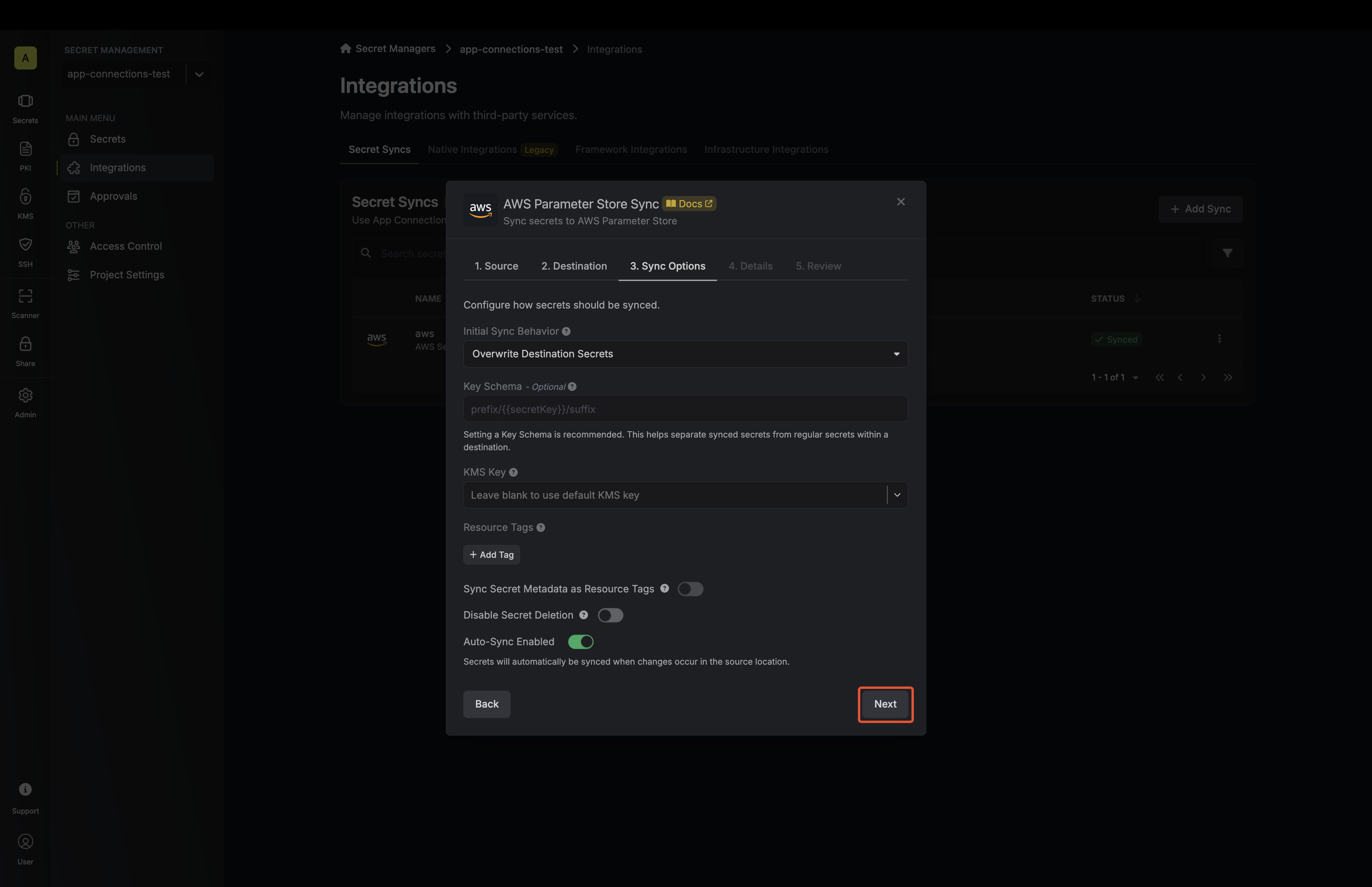 * **Initial Sync Behavior**: Determines how Infisical should resolve the initial sync.
* **Overwrite Destination Secrets**: Removes any secrets at the destination endpoint not present in Infisical.
* **Import Secrets (Prioritize Infisical)**: Imports secrets from the destination endpoint before syncing, prioritizing values from Infisical over Parameter Store when keys conflict.
* **Import Secrets (Prioritize AWS Parameter Store)**: Imports secrets from the destination endpoint before syncing, prioritizing values from Parameter Store over Infisical when keys conflict.
* **Key Schema**: Template that determines how secret names are transformed when syncing, using `{{secretKey}}` as a placeholder for the original secret name and `{{environment}}` for the environment.
We highly recommend using a Key Schema to ensure that Infisical only manages the specific keys you intend, keeping everything else untouched.
* **KMS Key**: The AWS KMS key ID or alias to encrypt parameters with.
* **Tags**: Optional resource tags to add to parameters synced by Infisical.
* **Sync Secret Metadata as Resource Tags**: If enabled, metadata attached to secrets will be added as resource tags to parameters synced by Infisical.
Manually configured tags from the **Tags** field will take precedence over secret metadata when tag keys conflict.
* **Auto-Sync Enabled**: If enabled, secrets will automatically be synced from the source location when changes occur. Disable to enforce manual syncing only.
* **Disable Secret Deletion**: If enabled, Infisical will not remove secrets from the sync destination. Enable this option if you intend to manage some secrets manually outside of Infisical.
6. Configure the **Details** of your Parameter Store Sync, then click **Next**.
* **Initial Sync Behavior**: Determines how Infisical should resolve the initial sync.
* **Overwrite Destination Secrets**: Removes any secrets at the destination endpoint not present in Infisical.
* **Import Secrets (Prioritize Infisical)**: Imports secrets from the destination endpoint before syncing, prioritizing values from Infisical over Parameter Store when keys conflict.
* **Import Secrets (Prioritize AWS Parameter Store)**: Imports secrets from the destination endpoint before syncing, prioritizing values from Parameter Store over Infisical when keys conflict.
* **Key Schema**: Template that determines how secret names are transformed when syncing, using `{{secretKey}}` as a placeholder for the original secret name and `{{environment}}` for the environment.
We highly recommend using a Key Schema to ensure that Infisical only manages the specific keys you intend, keeping everything else untouched.
* **KMS Key**: The AWS KMS key ID or alias to encrypt parameters with.
* **Tags**: Optional resource tags to add to parameters synced by Infisical.
* **Sync Secret Metadata as Resource Tags**: If enabled, metadata attached to secrets will be added as resource tags to parameters synced by Infisical.
Manually configured tags from the **Tags** field will take precedence over secret metadata when tag keys conflict.
* **Auto-Sync Enabled**: If enabled, secrets will automatically be synced from the source location when changes occur. Disable to enforce manual syncing only.
* **Disable Secret Deletion**: If enabled, Infisical will not remove secrets from the sync destination. Enable this option if you intend to manage some secrets manually outside of Infisical.
6. Configure the **Details** of your Parameter Store Sync, then click **Next**.
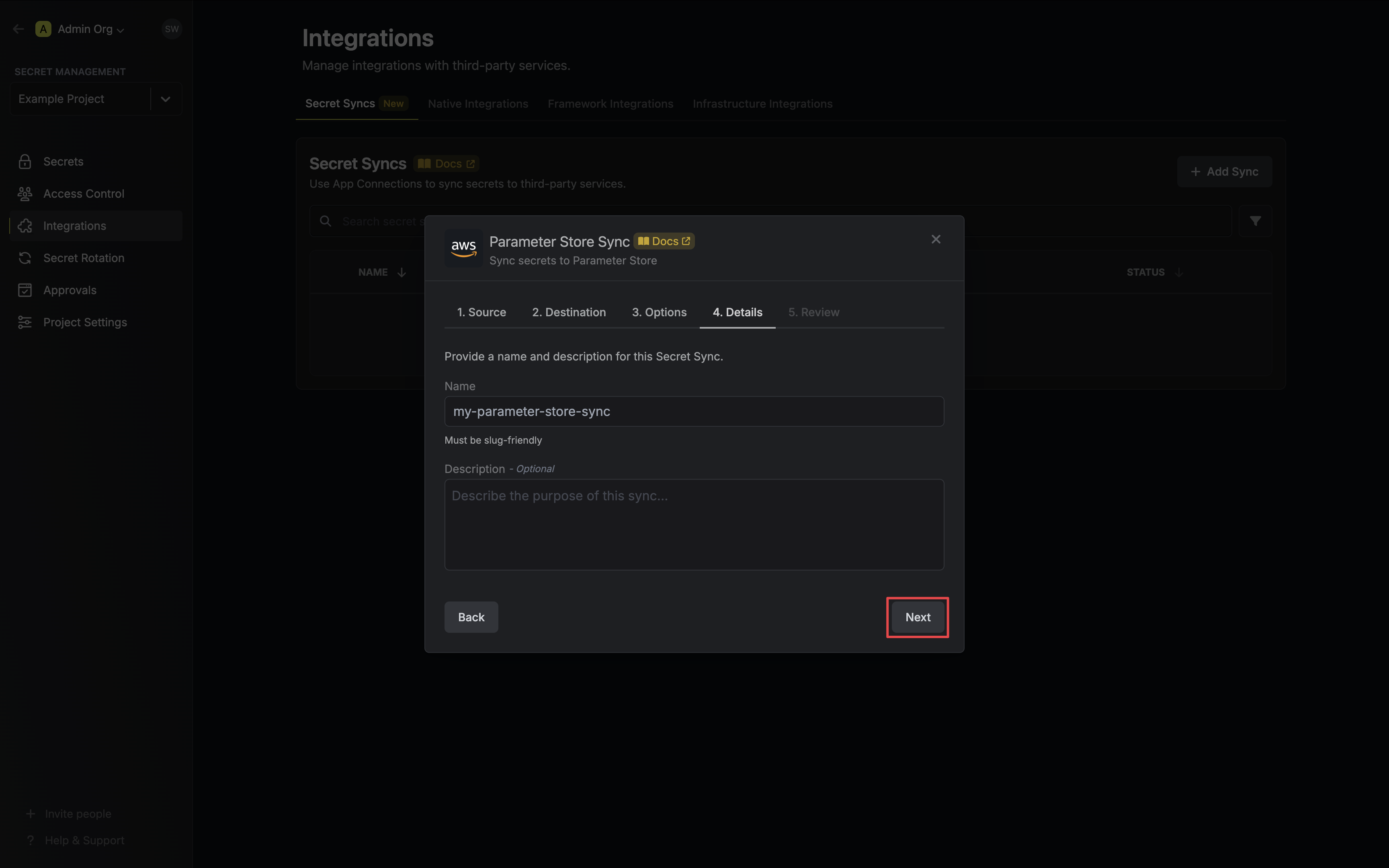 * **Name**: The name of your sync. Must be slug-friendly.
* **Description**: An optional description for your sync.
7. Review your Parameter Store Sync configuration, then click **Create Sync**.
* **Name**: The name of your sync. Must be slug-friendly.
* **Description**: An optional description for your sync.
7. Review your Parameter Store Sync configuration, then click **Create Sync**.
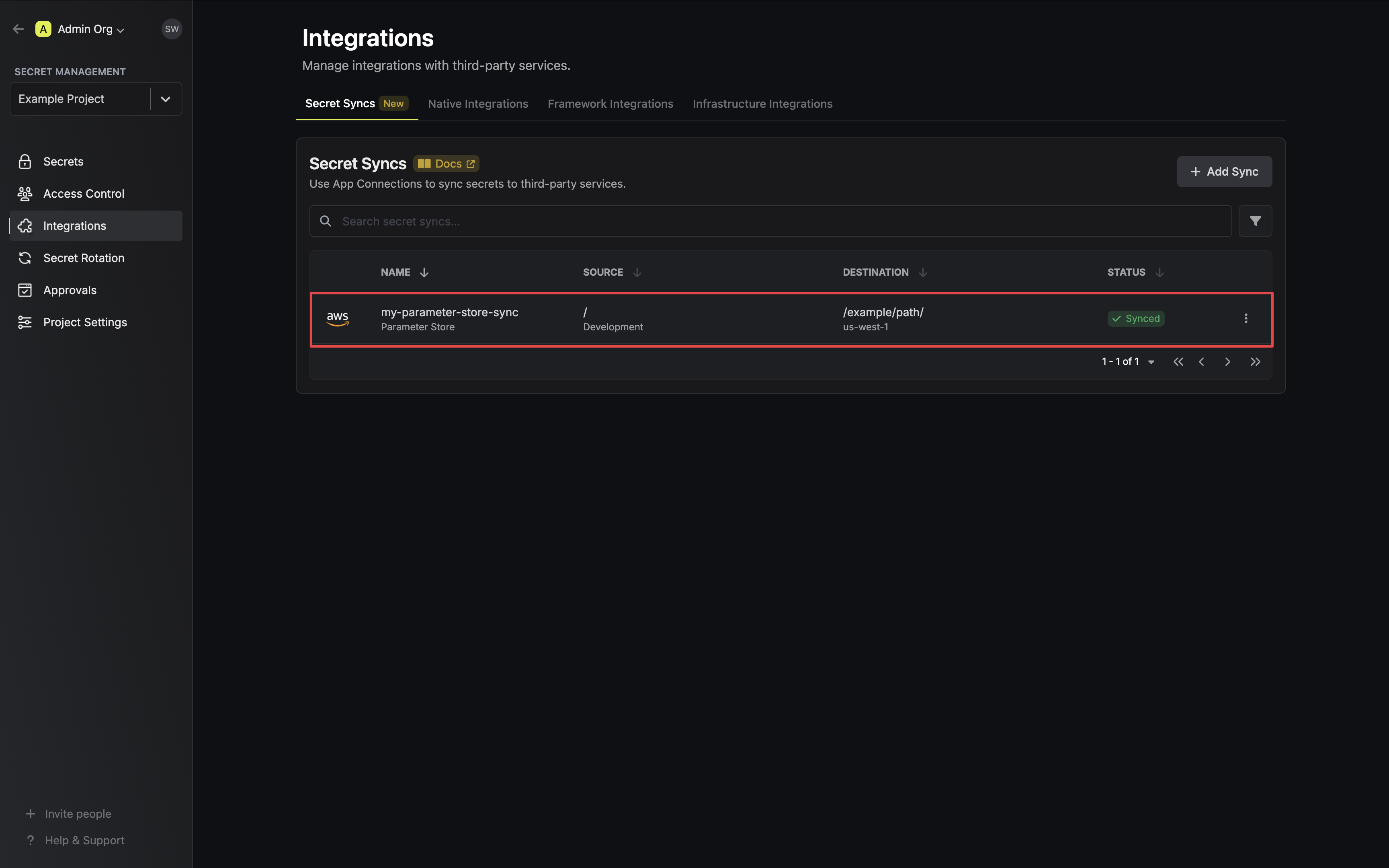
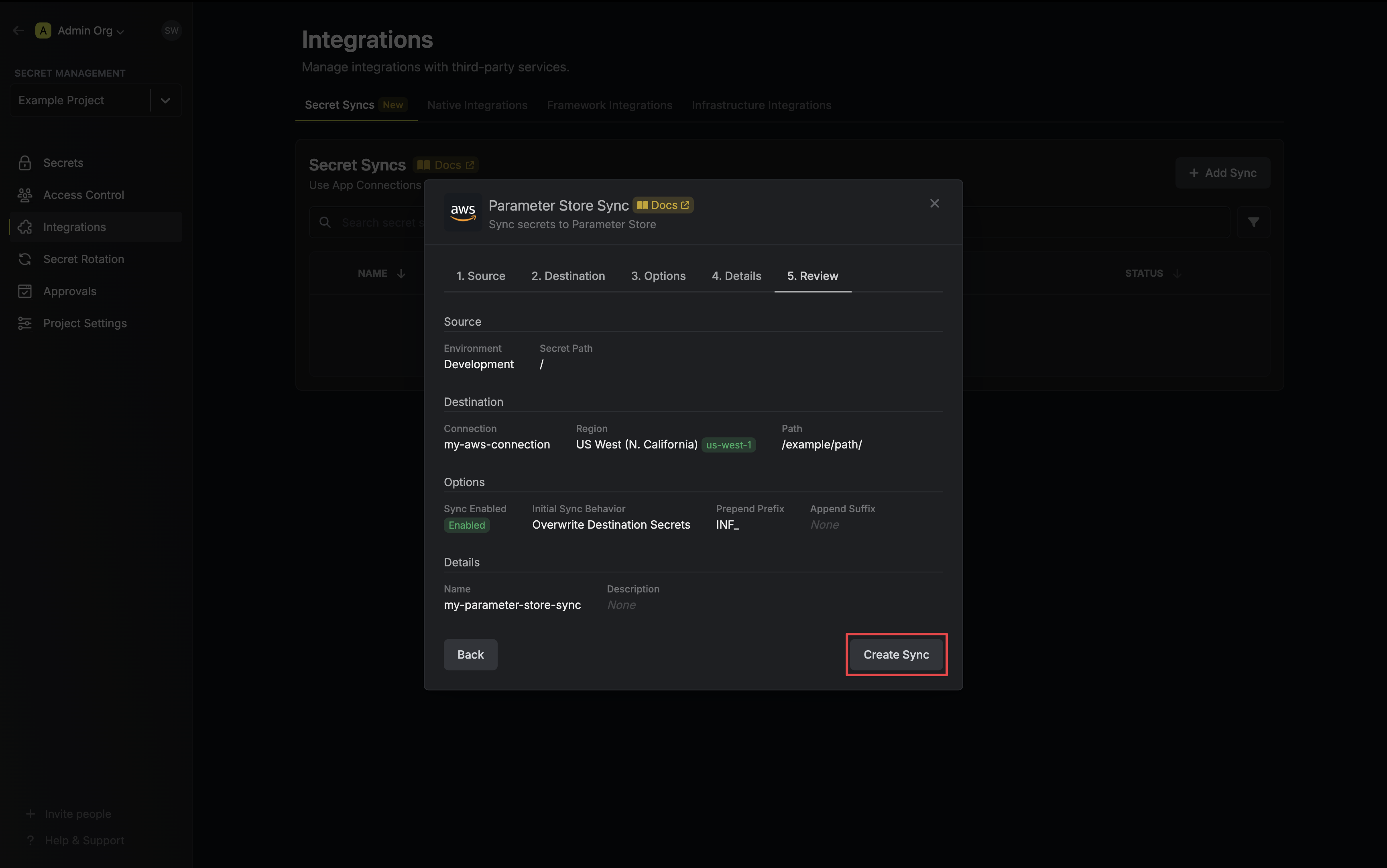 8. If enabled, your Parameter Store Sync will begin syncing your secrets to the destination endpoint.
 To create an **AWS Parameter Store Sync**, make an API request to the [Create AWS
Parameter Store Sync](/api-reference/endpoints/secret-syncs/aws-parameter-store/create) API endpoint.
### Sample request
```bash Request theme={null}
curl --request POST \
--url https://app.infisical.com/api/v1/secret-syncs/aws-parameter-store \
--header 'Content-Type: application/json' \
--data '{
"name": "my-parameter-store-sync",
"projectId": "3c90c3cc-0d44-4b50-8888-8dd25736052a",
"description": "an example sync",
"connectionId": "3c90c3cc-0d44-4b50-8888-8dd25736052a",
"environment": "dev",
"secretPath": "/my-secrets",
"isEnabled": true,
"syncOptions": {
"initialSyncBehavior": "overwrite-destination"
},
"destinationConfig": {
"region": "us-east-1",
"path": "/my-aws/path/"
}
}'
```
### Sample response
```bash Response theme={null}
{
"secretSync": {
"id": "3c90c3cc-0d44-4b50-8888-8dd25736052a",
"name": "my-parameter-store-sync",
"description": "an example sync",
"isEnabled": true,
"version": 1,
"folderId": "3c90c3cc-0d44-4b50-8888-8dd25736052a",
"connectionId": "3c90c3cc-0d44-4b50-8888-8dd25736052a",
"createdAt": "2023-11-07T05:31:56Z",
"updatedAt": "2023-11-07T05:31:56Z",
"syncStatus": "succeeded",
"lastSyncJobId": "123",
"lastSyncMessage": null,
"lastSyncedAt": "2023-11-07T05:31:56Z",
"importStatus": null,
"lastImportJobId": null,
"lastImportMessage": null,
"lastImportedAt": null,
"removeStatus": null,
"lastRemoveJobId": null,
"lastRemoveMessage": null,
"lastRemovedAt": null,
"syncOptions": {
"initialSyncBehavior": "overwrite-destination"
},
"projectId": "3c90c3cc-0d44-4b50-8888-8dd25736052a",
"connection": {
"app": "aws",
"name": "my-aws-connection",
"id": "3c90c3cc-0d44-4b50-8888-8dd25736052a"
},
"environment": {
"slug": "dev",
"name": "Development",
"id": "3c90c3cc-0d44-4b50-8888-8dd25736052a"
},
"folder": {
"id": "3c90c3cc-0d44-4b50-8888-8dd25736052a",
"path": "/my-secrets"
},
"destination": "aws-parameter-store",
"destinationConfig": {
"region": "us-east-1",
"path": "/my-aws/path/"
}
}
}
```
## FAQ
The path is required and will be prepended to the key schema. For example, if you have a path of `/demo/path/` and a key schema of `INFISICAL_{{secretKey}}`, then the result will be `/demo/path/INFISICAL_{{secretKey}}`.
To create an **AWS Parameter Store Sync**, make an API request to the [Create AWS
Parameter Store Sync](/api-reference/endpoints/secret-syncs/aws-parameter-store/create) API endpoint.
### Sample request
```bash Request theme={null}
curl --request POST \
--url https://app.infisical.com/api/v1/secret-syncs/aws-parameter-store \
--header 'Content-Type: application/json' \
--data '{
"name": "my-parameter-store-sync",
"projectId": "3c90c3cc-0d44-4b50-8888-8dd25736052a",
"description": "an example sync",
"connectionId": "3c90c3cc-0d44-4b50-8888-8dd25736052a",
"environment": "dev",
"secretPath": "/my-secrets",
"isEnabled": true,
"syncOptions": {
"initialSyncBehavior": "overwrite-destination"
},
"destinationConfig": {
"region": "us-east-1",
"path": "/my-aws/path/"
}
}'
```
### Sample response
```bash Response theme={null}
{
"secretSync": {
"id": "3c90c3cc-0d44-4b50-8888-8dd25736052a",
"name": "my-parameter-store-sync",
"description": "an example sync",
"isEnabled": true,
"version": 1,
"folderId": "3c90c3cc-0d44-4b50-8888-8dd25736052a",
"connectionId": "3c90c3cc-0d44-4b50-8888-8dd25736052a",
"createdAt": "2023-11-07T05:31:56Z",
"updatedAt": "2023-11-07T05:31:56Z",
"syncStatus": "succeeded",
"lastSyncJobId": "123",
"lastSyncMessage": null,
"lastSyncedAt": "2023-11-07T05:31:56Z",
"importStatus": null,
"lastImportJobId": null,
"lastImportMessage": null,
"lastImportedAt": null,
"removeStatus": null,
"lastRemoveJobId": null,
"lastRemoveMessage": null,
"lastRemovedAt": null,
"syncOptions": {
"initialSyncBehavior": "overwrite-destination"
},
"projectId": "3c90c3cc-0d44-4b50-8888-8dd25736052a",
"connection": {
"app": "aws",
"name": "my-aws-connection",
"id": "3c90c3cc-0d44-4b50-8888-8dd25736052a"
},
"environment": {
"slug": "dev",
"name": "Development",
"id": "3c90c3cc-0d44-4b50-8888-8dd25736052a"
},
"folder": {
"id": "3c90c3cc-0d44-4b50-8888-8dd25736052a",
"path": "/my-secrets"
},
"destination": "aws-parameter-store",
"destinationConfig": {
"region": "us-east-1",
"path": "/my-aws/path/"
}
}
}
```
## FAQ
The path is required and will be prepended to the key schema. For example, if you have a path of `/demo/path/` and a key schema of `INFISICAL_{{secretKey}}`, then the result will be `/demo/path/INFISICAL_{{secretKey}}`.