> ## Documentation Index
> Fetch the complete documentation index at: https://infisical-devin-1781641701-docs-github-pat-fine-grained.mintlify.site/llms.txt
> Use this file to discover all available pages before exploring further.
# Usage
> Learn what is secret scanning and why it matters for building secure systems.
## Introduction
Monitor and detect exposed secrets across your data sources, including code repositories, with Infisical Secret Scanning.
For additional security, we recommend using our [CLI Secret Scanner](/cli/scanning-overview#automatically-scan-changes-before-you-commit) to check for exposed secrets before pushing your code changes.
Secret Scanning is a paid feature. If you're using Infisical Cloud, then it is
available under the **Enterprise Tier**. If you're self-hosting Infisical,
then you should contact [sales@infisical.com](mailto:sales@infisical.com) to purchase an enterprise license
to use it.
## How Secret Scanning Works
Secret Scanning consists of several components that enable you to quickly respond to secret leaks:
* **Scanner Engine**: The core component that analyzes your code and detects potential secrets using pattern matching and entropy analysis
* **Real-time Monitoring**: Provides continuous surveillance of your repositories for immediate detection of exposed secrets
* **Alert System**: Notifies organization admins via email when secrets are detected
* **Risk Management**: Allows tracking and managing detected secrets with different status options
* **Data Sources**: Integrates with various data sources and version control systems
* **Customizable Rules**: Supports ignore patterns and custom configurations to reduce false positives
These components work together to provide comprehensive secret detection and incident response capabilities.
### Data Sources
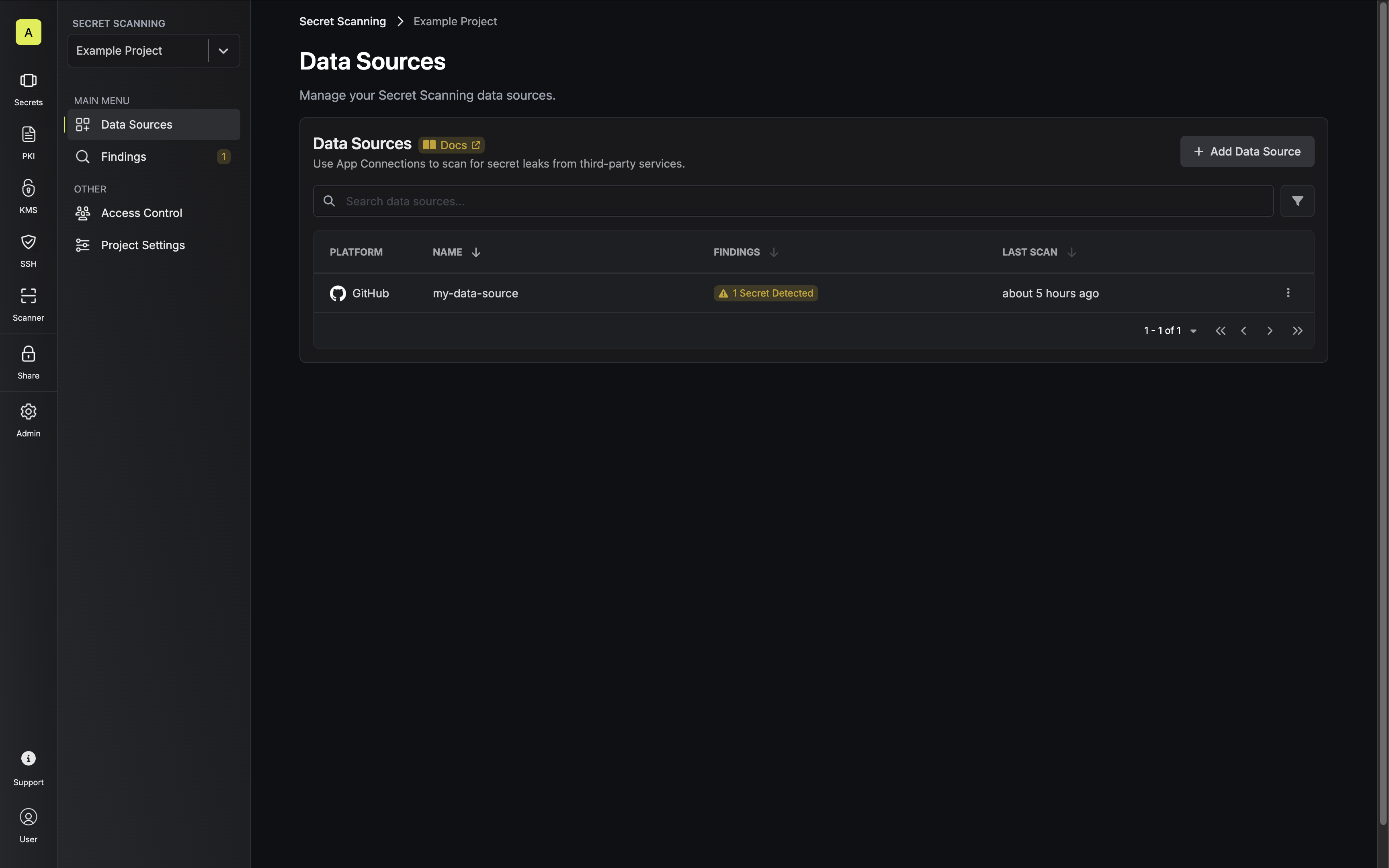
Data sources are configured integrations with external platforms, such as a GitHub organization or a GitLab group, that establish secure connections for scanning purposes using [App Connections](/integrations/app-connections/overview).
A data source acts as a secure intermediary between the external system and the scanner engine. It manages a collection of scannable resources (such as repositories) and handles the authentication and communication required for scanning operations.
 ### Resources
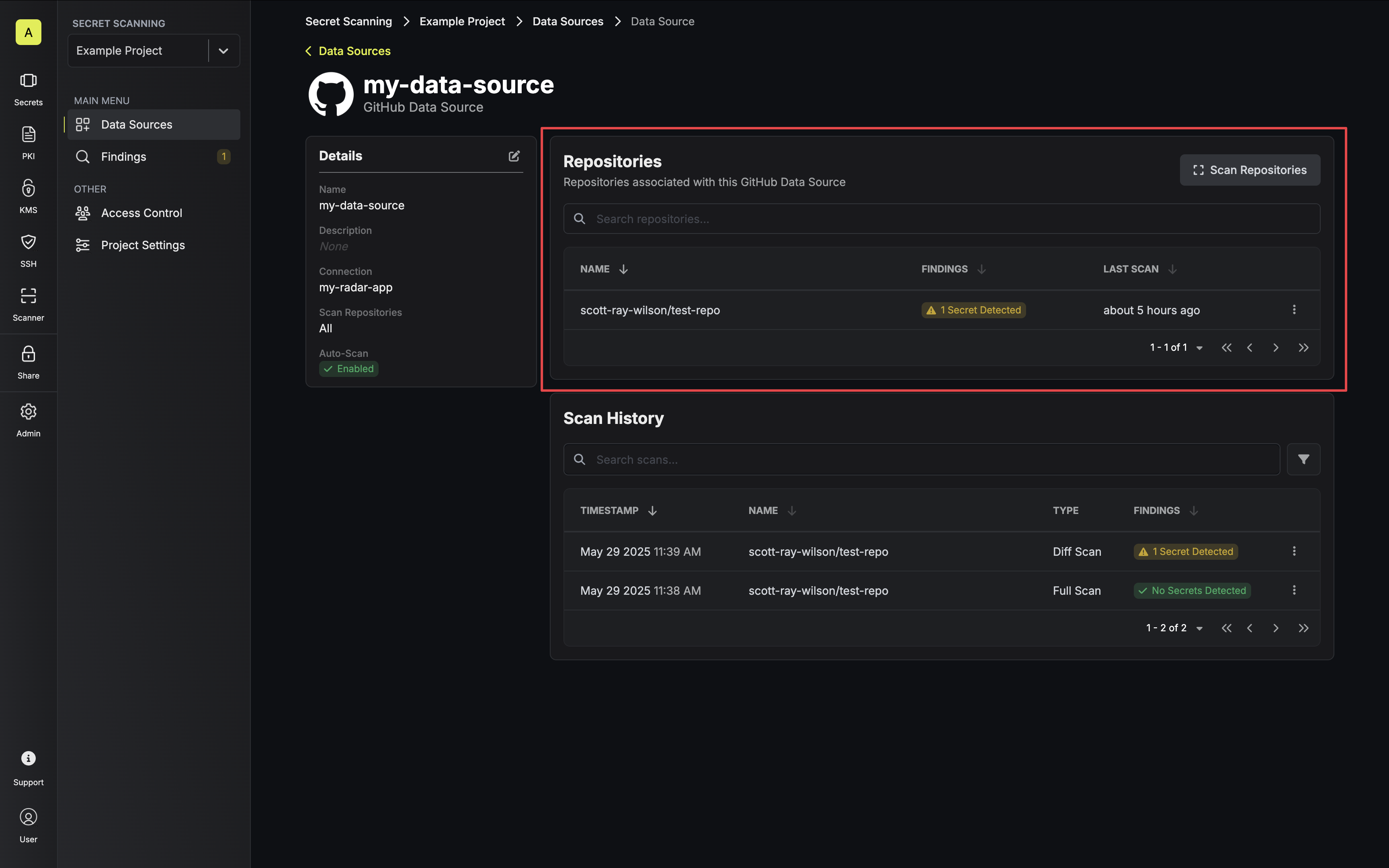
Resources are the atomic, scannable units, such as a repository, that can be monitored for secret exposure. Resources are added automatically when a data source is scanned and updated when scanning events are triggered, such as when a user pushes changes to GitHub.
Each resource maintains its own scanning history and status, allowing for granular monitoring and management of secret scanning across your organization.
### Resources
Resources are the atomic, scannable units, such as a repository, that can be monitored for secret exposure. Resources are added automatically when a data source is scanned and updated when scanning events are triggered, such as when a user pushes changes to GitHub.
Each resource maintains its own scanning history and status, allowing for granular monitoring and management of secret scanning across your organization.
 ### Scans
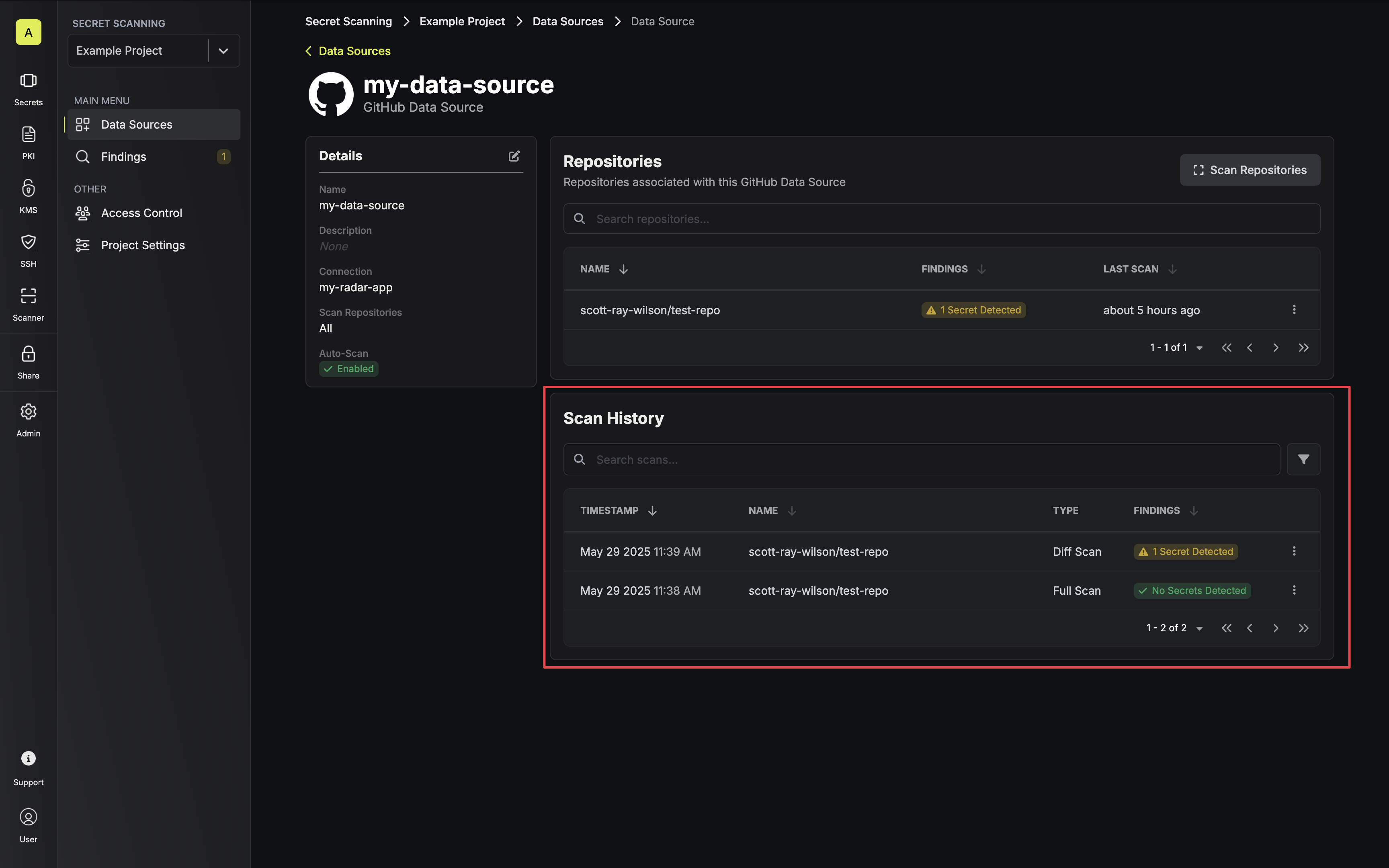
Scans can be initiated in two ways:
1. **Full Scan** - Manually triggered scan that comprehensively checks either all resources associated with a data source or a single selected resource.
2. **Diff Scan** - Automatically executed when **Auto-Scan** is enabled on a data source. This scan type specifically focuses on updates to existing resources.
All scan activities can be monitored in real-time through the Infisical UI, which displays:
* Current scan status
* Timestamp of the scan
* Resource(s) being scanned
* Detection results (whether any secrets were found)
### Scans
Scans can be initiated in two ways:
1. **Full Scan** - Manually triggered scan that comprehensively checks either all resources associated with a data source or a single selected resource.
2. **Diff Scan** - Automatically executed when **Auto-Scan** is enabled on a data source. This scan type specifically focuses on updates to existing resources.
All scan activities can be monitored in real-time through the Infisical UI, which displays:
* Current scan status
* Timestamp of the scan
* Resource(s) being scanned
* Detection results (whether any secrets were found)
 ### Findings
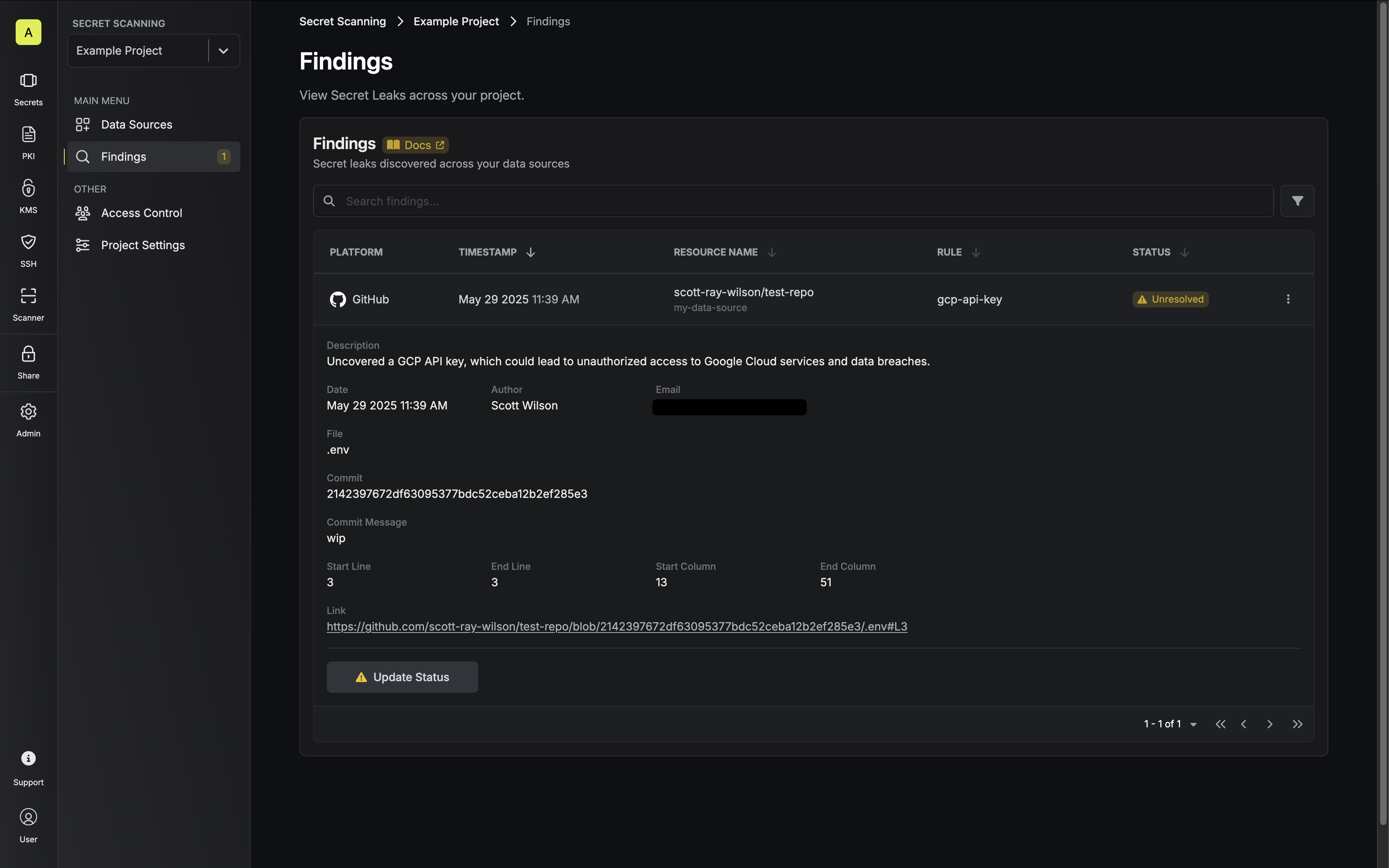
Findings are automatically generated when secret leaks are detected during scanning operations. Each finding contains comprehensive information including:
* The specific scanning rule that identified the leak
* File location and line number where the secret was found
* Resource-specific details (e.g., commit hash and author for Git repositories)
Findings are initially marked as **Unresolved** and can be updated to one of the following statuses with additional remarks:
* **Resolved** - The issue has been addressed
* **False Positive** - The detection was incorrect
* **Ignore** - The finding can be safely disregarded
These status options help teams effectively track and manage the lifecycle of detected secret leaks.
### Findings
Findings are automatically generated when secret leaks are detected during scanning operations. Each finding contains comprehensive information including:
* The specific scanning rule that identified the leak
* File location and line number where the secret was found
* Resource-specific details (e.g., commit hash and author for Git repositories)
Findings are initially marked as **Unresolved** and can be updated to one of the following statuses with additional remarks:
* **Resolved** - The issue has been addressed
* **False Positive** - The detection was incorrect
* **Ignore** - The finding can be safely disregarded
These status options help teams effectively track and manage the lifecycle of detected secret leaks.
 ### Configuration
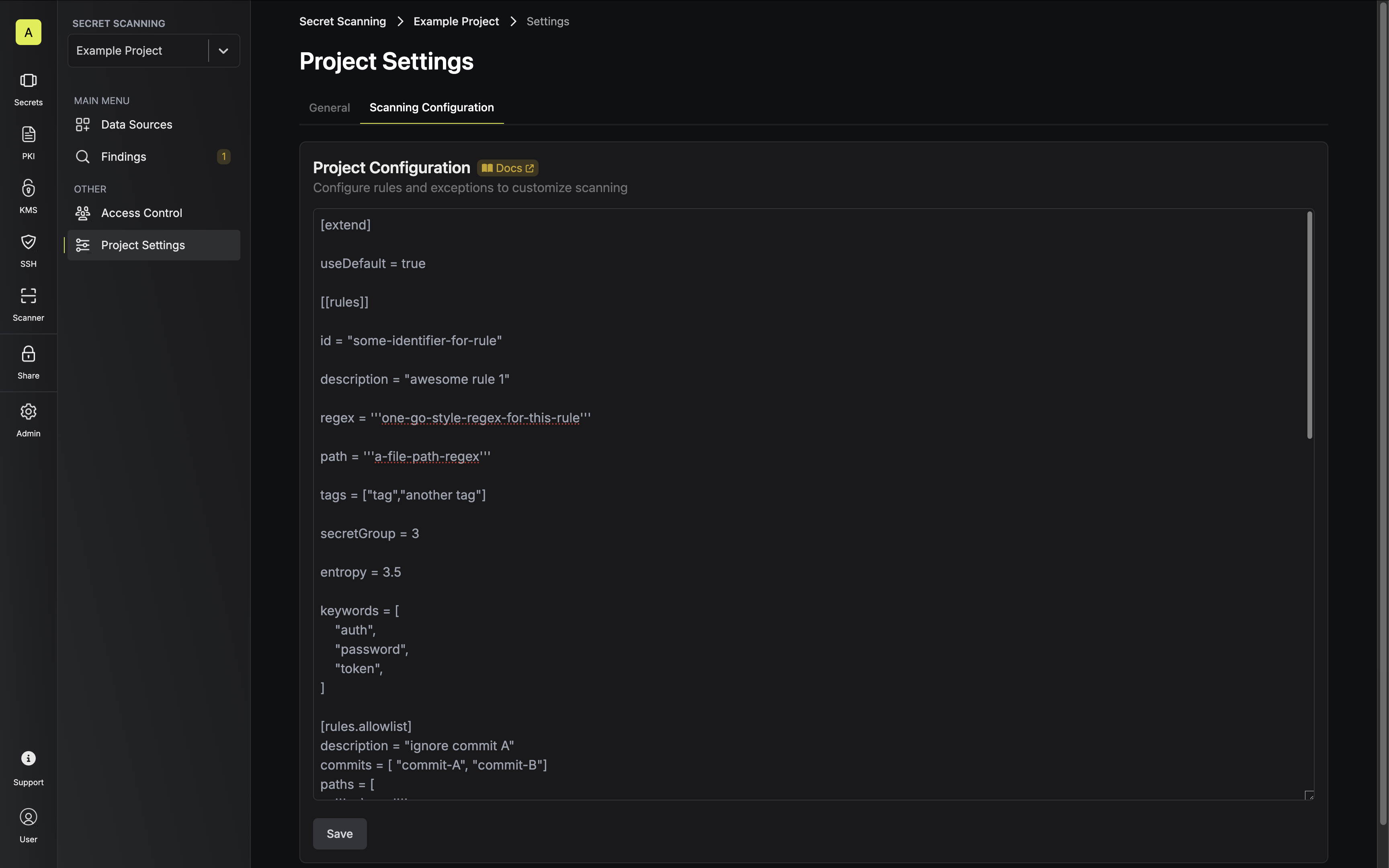
You can configure custom scanning rules and exceptions by updating your project's scanning configuration via the UI or API.
The configuration options allow you to:
* Define custom scanning patterns and rules
* Set up ignore patterns to reduce false positives
* Specify file path exclusions
* Configure entropy thresholds for secret detection
* Add allowlists for known safe patterns
For detailed configuration options, expand the example configuration below.
```toml theme={null}
# Title for the configuration file
title = "Some title"
# This configuration is the foundation that can be expanded. If there are any overlapping rules
# between this base and the expanded configuration, the rules in this base will take priority.
# Another aspect of extending configurations is the ability to link multiple files, up to a depth of 2.
# "Allowlist" arrays get appended and may have repeated elements.
# "useDefault" and "path" cannot be used simultaneously. Please choose one.
[extend]
# useDefault will extend the base configuration with the default config:
# https://raw.githubusercontent.com/Infisical/infisical/main/cli/config/infisical-scan.toml
useDefault = true
# or you can supply a path to a configuration. Path is relative to where infisical cli
# was invoked, not the location of the base config.
path = "common_config.toml"
# An array of tables that contain information that define instructions
# on how to detect secrets
[[rules]]
# Unique identifier for this rule
id = "some-identifier-for-rule"
# Short human readable description of the rule.
description = "awesome rule 1"
# Golang regular expression used to detect secrets. Note Golang's regex engine
# does not support lookaheads.
regex = '''one-go-style-regex-for-this-rule'''
# Golang regular expression used to match paths. This can be used as a standalone rule or it can be used
# in conjunction with a valid `regex` entry.
path = '''a-file-path-regex'''
# Array of strings used for metadata and reporting purposes.
tags = ["tag","another tag"]
# A regex match may have many groups, this allows you to specify the group that should be used as (which group the secret is contained in)
# its entropy checked if `entropy` is set.
secretGroup = 3
# Float representing the minimum shannon entropy a regex group must have to be considered a secret.
# Shannon entropy measures how random a data is. Since secrets are usually composed of many random characters, they typically have high entropy
entropy = 3.5
# Keywords are used for pre-regex check filtering.
# If rule has keywords but the text fragment being scanned doesn't have at least one of it's keywords, it will be skipped for processing further.
# Ideally these values should either be part of the identifier or unique strings specific to the rule's regex
# (introduced in v8.6.0)
keywords = [
"auth",
"password",
"token",
]
# You can include an allowlist table for a single rule to reduce false positives or ignore commits
# with known/rotated secrets
[rules.allowlist]
description = "ignore commit A"
commits = [ "commit-A", "commit-B"]
paths = [
'''go\.mod''',
'''go\.sum'''
]
# note: (rule) regexTarget defaults to check the _Secret_ in the finding.
# if regexTarget is not specified then _Secret_ will be used.
# Acceptable values for regexTarget are "match" and "line"
regexTarget = "match"
regexes = [
'''process''',
'''getenv''',
]
# note: stopwords targets the extracted secret, not the entire regex match
# if the extracted secret is found in the stopwords list, the finding will be skipped (i.e not included in report)
stopwords = [
'''client''',
'''endpoint''',
]
# This is a global allowlist which has a higher order of precedence than rule-specific allowlists.
# If a commit listed in the `commits` field below is encountered then that commit will be skipped and no
# secrets will be detected for said commit. The same logic applies for regexes and paths.
[allowlist]
description = "global allow list"
commits = [ "commit-A", "commit-B", "commit-C"]
paths = [
'''gitleaks\.toml''',
'''(.*?)(jpg|gif|doc)'''
]
# note: (global) regexTarget defaults to check the _Secret_ in the finding.
# if regexTarget is not specified then _Secret_ will be used.
# Acceptable values for regexTarget are "match" and "line"
regexTarget = "match"
regexes = [
'''219-09-9999''',
'''078-05-1120''',
'''(9[0-9]{2}|666)-\d{2}-\d{4}''',
]
# note: stopwords targets the extracted secret, not the entire regex match
# if the extracted secret is found in the stopwords list, the finding will be skipped (i.e not included in report)
stopwords = [
'''client''',
'''endpoint''',
]
```
### Configuration
You can configure custom scanning rules and exceptions by updating your project's scanning configuration via the UI or API.
The configuration options allow you to:
* Define custom scanning patterns and rules
* Set up ignore patterns to reduce false positives
* Specify file path exclusions
* Configure entropy thresholds for secret detection
* Add allowlists for known safe patterns
For detailed configuration options, expand the example configuration below.
```toml theme={null}
# Title for the configuration file
title = "Some title"
# This configuration is the foundation that can be expanded. If there are any overlapping rules
# between this base and the expanded configuration, the rules in this base will take priority.
# Another aspect of extending configurations is the ability to link multiple files, up to a depth of 2.
# "Allowlist" arrays get appended and may have repeated elements.
# "useDefault" and "path" cannot be used simultaneously. Please choose one.
[extend]
# useDefault will extend the base configuration with the default config:
# https://raw.githubusercontent.com/Infisical/infisical/main/cli/config/infisical-scan.toml
useDefault = true
# or you can supply a path to a configuration. Path is relative to where infisical cli
# was invoked, not the location of the base config.
path = "common_config.toml"
# An array of tables that contain information that define instructions
# on how to detect secrets
[[rules]]
# Unique identifier for this rule
id = "some-identifier-for-rule"
# Short human readable description of the rule.
description = "awesome rule 1"
# Golang regular expression used to detect secrets. Note Golang's regex engine
# does not support lookaheads.
regex = '''one-go-style-regex-for-this-rule'''
# Golang regular expression used to match paths. This can be used as a standalone rule or it can be used
# in conjunction with a valid `regex` entry.
path = '''a-file-path-regex'''
# Array of strings used for metadata and reporting purposes.
tags = ["tag","another tag"]
# A regex match may have many groups, this allows you to specify the group that should be used as (which group the secret is contained in)
# its entropy checked if `entropy` is set.
secretGroup = 3
# Float representing the minimum shannon entropy a regex group must have to be considered a secret.
# Shannon entropy measures how random a data is. Since secrets are usually composed of many random characters, they typically have high entropy
entropy = 3.5
# Keywords are used for pre-regex check filtering.
# If rule has keywords but the text fragment being scanned doesn't have at least one of it's keywords, it will be skipped for processing further.
# Ideally these values should either be part of the identifier or unique strings specific to the rule's regex
# (introduced in v8.6.0)
keywords = [
"auth",
"password",
"token",
]
# You can include an allowlist table for a single rule to reduce false positives or ignore commits
# with known/rotated secrets
[rules.allowlist]
description = "ignore commit A"
commits = [ "commit-A", "commit-B"]
paths = [
'''go\.mod''',
'''go\.sum'''
]
# note: (rule) regexTarget defaults to check the _Secret_ in the finding.
# if regexTarget is not specified then _Secret_ will be used.
# Acceptable values for regexTarget are "match" and "line"
regexTarget = "match"
regexes = [
'''process''',
'''getenv''',
]
# note: stopwords targets the extracted secret, not the entire regex match
# if the extracted secret is found in the stopwords list, the finding will be skipped (i.e not included in report)
stopwords = [
'''client''',
'''endpoint''',
]
# This is a global allowlist which has a higher order of precedence than rule-specific allowlists.
# If a commit listed in the `commits` field below is encountered then that commit will be skipped and no
# secrets will be detected for said commit. The same logic applies for regexes and paths.
[allowlist]
description = "global allow list"
commits = [ "commit-A", "commit-B", "commit-C"]
paths = [
'''gitleaks\.toml''',
'''(.*?)(jpg|gif|doc)'''
]
# note: (global) regexTarget defaults to check the _Secret_ in the finding.
# if regexTarget is not specified then _Secret_ will be used.
# Acceptable values for regexTarget are "match" and "line"
regexTarget = "match"
regexes = [
'''219-09-9999''',
'''078-05-1120''',
'''(9[0-9]{2}|666)-\d{2}-\d{4}''',
]
# note: stopwords targets the extracted secret, not the entire regex match
# if the extracted secret is found in the stopwords list, the finding will be skipped (i.e not included in report)
stopwords = [
'''client''',
'''endpoint''',
]
```
 ## Ignoring Known Secrets
If you're intentionally committing a test secret that the secret scanner might flag, you can instruct Infisical to overlook that secret with the methods listed below.
### infisical-scan:ignore
To ignore a secret contained in line of code, simply add `infisical-scan:ignore ` at the end of the line as comment in the given programming.
```js example.js theme={null}
function helloWorld() {
console.log("8dyfuiRyq=vVc3RRr_edRk-fK__JItpZ"); // infisical-scan:ignore
}
```
### .infisicalignore
An alternative method to exclude specific findings involves creating a .infisicalignore file at your repository's root.
You can then add the fingerprints of the findings you wish to exclude. The [Infisical scan](/cli/scanning-overview) report provides a unique Fingerprint for each secret found.
By incorporating these Fingerprints into the .infisicalignore file, Infisical will skip the corresponding secret findings in subsequent scans.
```.ignore .infisicalignore theme={null}
bea0ff6e05a4de73a5db625d4ae181a015b50855:frontend/components/utilities/attemptLogin.js:stripe-access-token:147
bea0ff6e05a4de73a5db625d4ae181a015b50855:backend/src/json/integrations.json:generic-api-key:5
1961b92340e5d2613acae528b886c842427ce5d0:frontend/components/utilities/attemptLogin.js:stripe-access-token:148
```
## Ignoring Known Secrets
If you're intentionally committing a test secret that the secret scanner might flag, you can instruct Infisical to overlook that secret with the methods listed below.
### infisical-scan:ignore
To ignore a secret contained in line of code, simply add `infisical-scan:ignore ` at the end of the line as comment in the given programming.
```js example.js theme={null}
function helloWorld() {
console.log("8dyfuiRyq=vVc3RRr_edRk-fK__JItpZ"); // infisical-scan:ignore
}
```
### .infisicalignore
An alternative method to exclude specific findings involves creating a .infisicalignore file at your repository's root.
You can then add the fingerprints of the findings you wish to exclude. The [Infisical scan](/cli/scanning-overview) report provides a unique Fingerprint for each secret found.
By incorporating these Fingerprints into the .infisicalignore file, Infisical will skip the corresponding secret findings in subsequent scans.
```.ignore .infisicalignore theme={null}
bea0ff6e05a4de73a5db625d4ae181a015b50855:frontend/components/utilities/attemptLogin.js:stripe-access-token:147
bea0ff6e05a4de73a5db625d4ae181a015b50855:backend/src/json/integrations.json:generic-api-key:5
1961b92340e5d2613acae528b886c842427ce5d0:frontend/components/utilities/attemptLogin.js:stripe-access-token:148
```