> ## Documentation Index
> Fetch the complete documentation index at: https://infisical-devin-1781641701-docs-github-pat-fine-grained.mintlify.site/llms.txt
> Use this file to discover all available pages before exploring further.
# Couchbase
> Learn how to dynamically generate Couchbase Database user credentials.
The Infisical Couchbase dynamic secret allows you to generate Couchbase Cloud Database user credentials on demand based on configured roles and bucket access permissions.
## Prerequisite
Create an API Key in your Couchbase Cloud following the [official documentation](https://docs.couchbase.com/cloud/get-started/create-account.html#create-api-key).
The API Key must have permission to manage database users in your Couchbase Cloud organization and project.
## Set up Dynamic Secrets with Couchbase
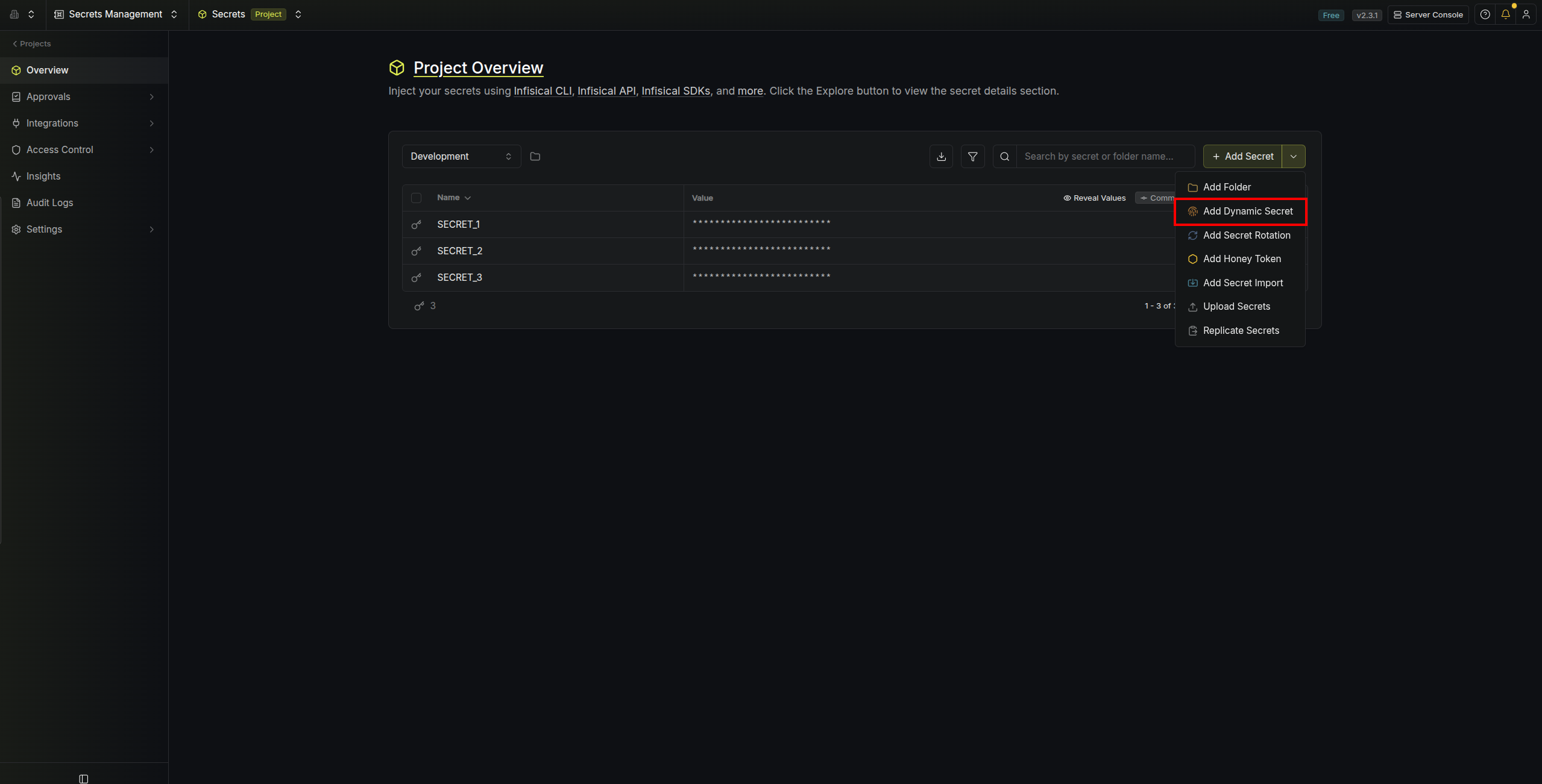
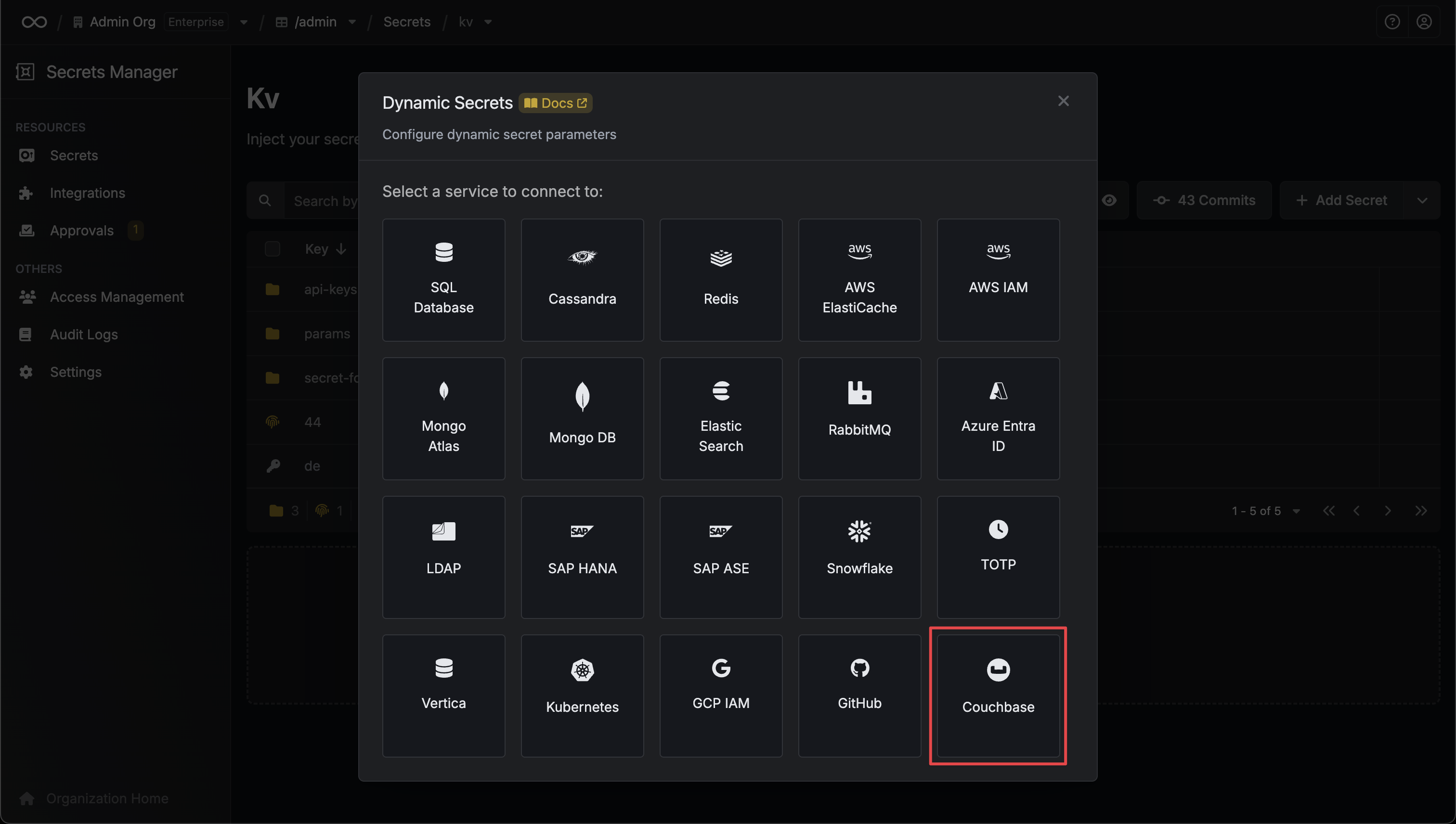
Open the Secret Overview dashboard and select the environment in which you would like to add a dynamic secret.
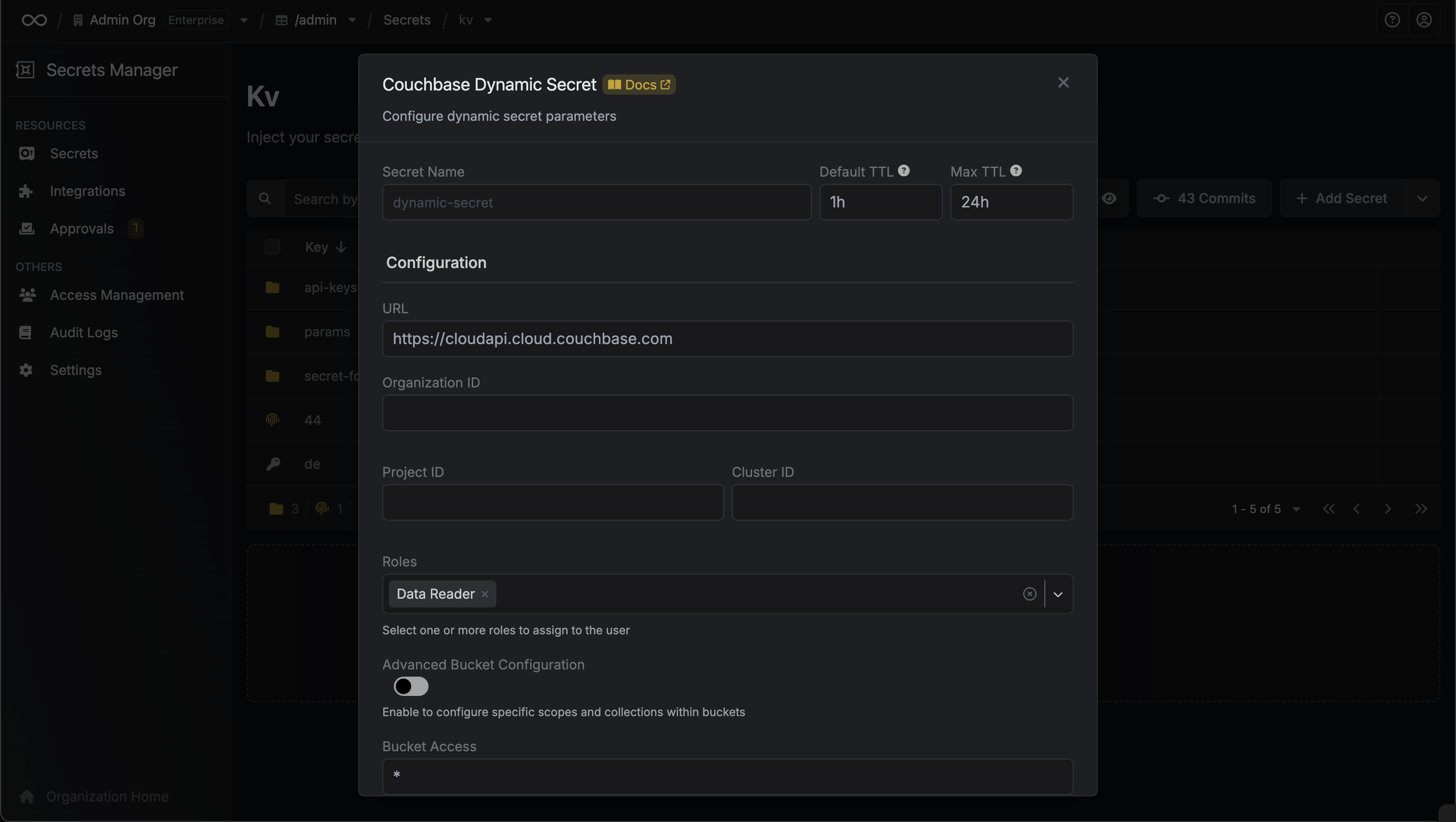
 Name by which you want the secret to be referenced
Default time-to-live for a generated secret (it is possible to modify this value after a secret is generated)
Maximum time-to-live for a generated secret
The Couchbase Cloud API URL
Your Couchbase Cloud organization ID
Your Couchbase Cloud project ID
Your Couchbase Cloud cluster ID where users will be created
Database credential roles to assign to the generated user. Available options:
* **read**: Read access to bucket data (alias for data\_reader)
* **write**: Read and write access to bucket data (alias for data\_writer)
Specify bucket access configuration:
* Use `*` for access to all buckets
* Use comma-separated bucket names (e.g., `bucket1,bucket2,bucket3`) for specific buckets
* Use Advanced Bucket Configuration for granular scope and collection access
Your Couchbase Cloud API Key for authentication
Name by which you want the secret to be referenced
Default time-to-live for a generated secret (it is possible to modify this value after a secret is generated)
Maximum time-to-live for a generated secret
The Couchbase Cloud API URL
Your Couchbase Cloud organization ID
Your Couchbase Cloud project ID
Your Couchbase Cloud cluster ID where users will be created
Database credential roles to assign to the generated user. Available options:
* **read**: Read access to bucket data (alias for data\_reader)
* **write**: Read and write access to bucket data (alias for data\_writer)
Specify bucket access configuration:
* Use `*` for access to all buckets
* Use comma-separated bucket names (e.g., `bucket1,bucket2,bucket3`) for specific buckets
* Use Advanced Bucket Configuration for granular scope and collection access
Your Couchbase Cloud API Key for authentication
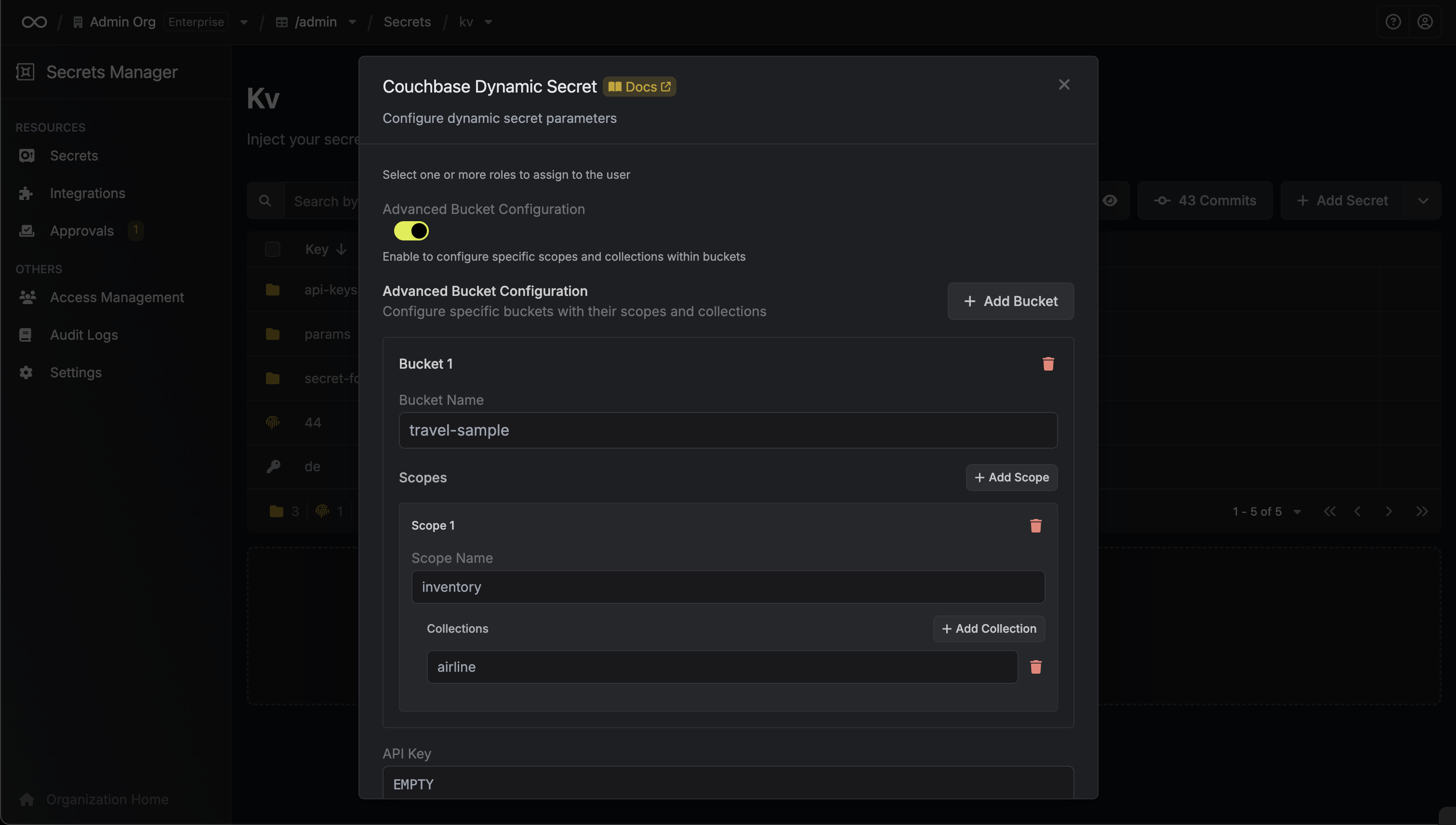 Enable advanced bucket configuration to specify granular access to buckets, scopes, and collections
When Advanced Bucket Configuration is enabled, you can configure:
List of buckets with optional scope and collection specifications:
* **Bucket Name**: Name of the bucket (e.g., travel-sample)
* **Scopes**: Optional array of scopes within the bucket
* **Scope Name**: Name of the scope (e.g., inventory, \_default)
* **Collections**: Optional array of collection names within the scope
Specifies a template for generating usernames. This field allows customization of how usernames are automatically created.
Allowed template variables are:
* `{{randomUsername}}`: Random username string.
* `{{unixTimestamp}}`: Current Unix timestamp at the time of lease creation.
* `{{identity.name}}`: Name of the identity that is generating the lease.
* `{{dynamicSecret.name}}`: Name of the associated dynamic secret.
* `{{dynamicSecret.type}}`: Type of the associated dynamic secret.
* `{{random N}}`: Random string of N characters.
Allowed template functions are:
* `truncate`: Truncates a string to a specified length.
* `replace`: Replaces a substring with another value.
* `uppercase`: Converts a string to uppercase.
* `lowercase`: Converts a string to lowercase.
Examples:
```yaml theme={null}
{{ randomUsername }} // 3POnzeFyK9gW2nioK0q2gMjr6CZqsRiX
{{ unixTimestamp }} // 17490641580
{{ identity.name }} //
{{ random 5 }} // x9K2m
{{ truncate identity.name 4 }} // test
{{ replace identity.name '' 'new-value' }} // new-value
```
Optional password generation requirements for Couchbase users:
Length of the generated password
Minimum required character counts:
* **Lowercase Count**: Minimum lowercase letters (default: 1)
* **Uppercase Count**: Minimum uppercase letters (default: 1)
* **Digit Count**: Minimum digits (default: 1)
* **Symbol Count**: Minimum special characters (default: 1)
Special characters allowed in passwords. Cannot contain: `< > ; . * & | £`
Couchbase password requirements: minimum 8 characters, maximum 128 characters, at least 1 uppercase, 1 lowercase, 1 digit, and 1 special character. Cannot contain: `< > ; . * & | £`
After submitting the form, you will see a dynamic secret created in the dashboard.
If this step fails, you may need to verify your Couchbase Cloud API key permissions and organization/project/cluster IDs.
Enable advanced bucket configuration to specify granular access to buckets, scopes, and collections
When Advanced Bucket Configuration is enabled, you can configure:
List of buckets with optional scope and collection specifications:
* **Bucket Name**: Name of the bucket (e.g., travel-sample)
* **Scopes**: Optional array of scopes within the bucket
* **Scope Name**: Name of the scope (e.g., inventory, \_default)
* **Collections**: Optional array of collection names within the scope
Specifies a template for generating usernames. This field allows customization of how usernames are automatically created.
Allowed template variables are:
* `{{randomUsername}}`: Random username string.
* `{{unixTimestamp}}`: Current Unix timestamp at the time of lease creation.
* `{{identity.name}}`: Name of the identity that is generating the lease.
* `{{dynamicSecret.name}}`: Name of the associated dynamic secret.
* `{{dynamicSecret.type}}`: Type of the associated dynamic secret.
* `{{random N}}`: Random string of N characters.
Allowed template functions are:
* `truncate`: Truncates a string to a specified length.
* `replace`: Replaces a substring with another value.
* `uppercase`: Converts a string to uppercase.
* `lowercase`: Converts a string to lowercase.
Examples:
```yaml theme={null}
{{ randomUsername }} // 3POnzeFyK9gW2nioK0q2gMjr6CZqsRiX
{{ unixTimestamp }} // 17490641580
{{ identity.name }} //
{{ random 5 }} // x9K2m
{{ truncate identity.name 4 }} // test
{{ replace identity.name '' 'new-value' }} // new-value
```
Optional password generation requirements for Couchbase users:
Length of the generated password
Minimum required character counts:
* **Lowercase Count**: Minimum lowercase letters (default: 1)
* **Uppercase Count**: Minimum uppercase letters (default: 1)
* **Digit Count**: Minimum digits (default: 1)
* **Symbol Count**: Minimum special characters (default: 1)
Special characters allowed in passwords. Cannot contain: `< > ; . * & | £`
Couchbase password requirements: minimum 8 characters, maximum 128 characters, at least 1 uppercase, 1 lowercase, 1 digit, and 1 special character. Cannot contain: `< > ; . * & | £`
After submitting the form, you will see a dynamic secret created in the dashboard.
If this step fails, you may need to verify your Couchbase Cloud API key permissions and organization/project/cluster IDs.
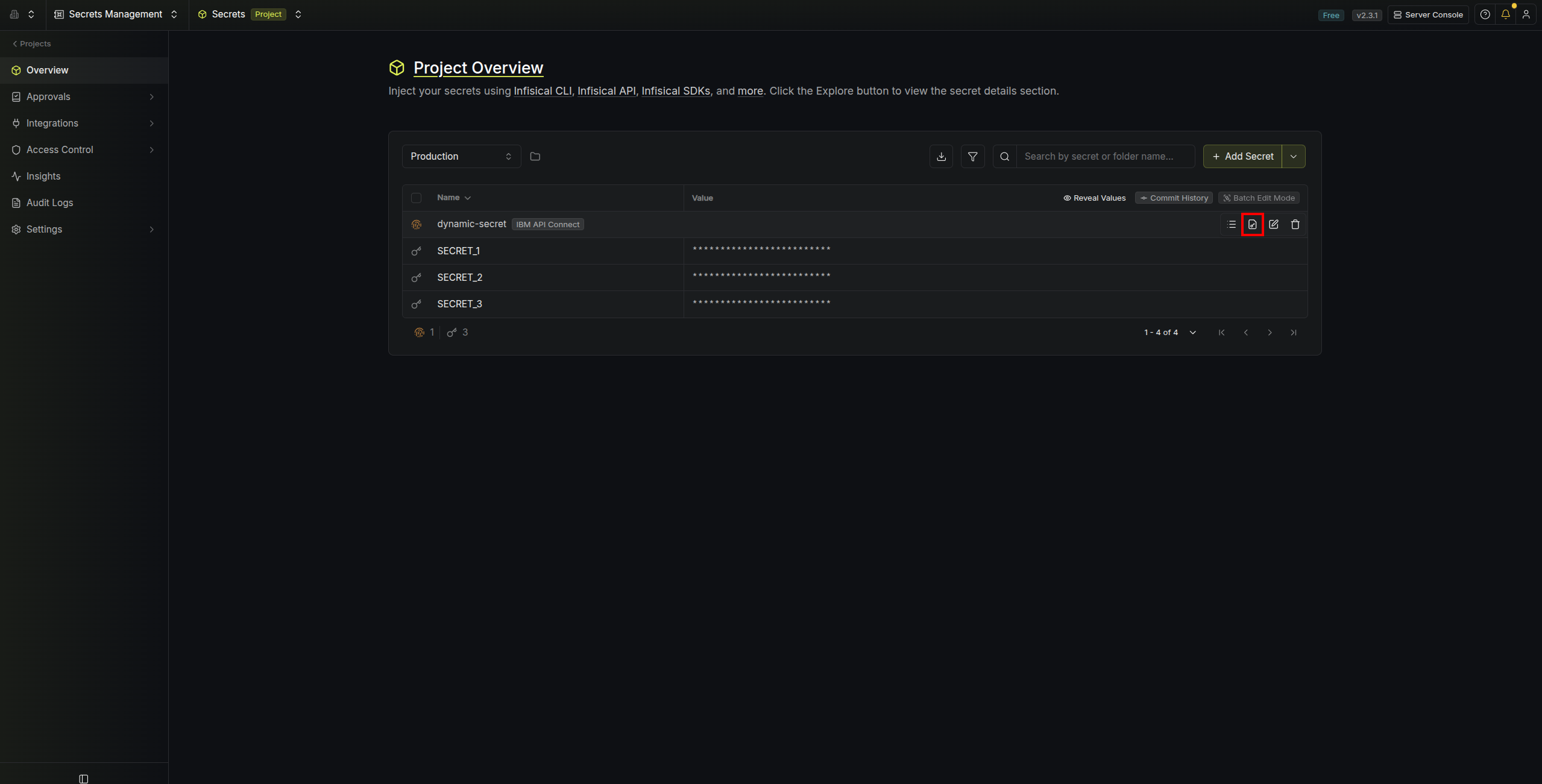
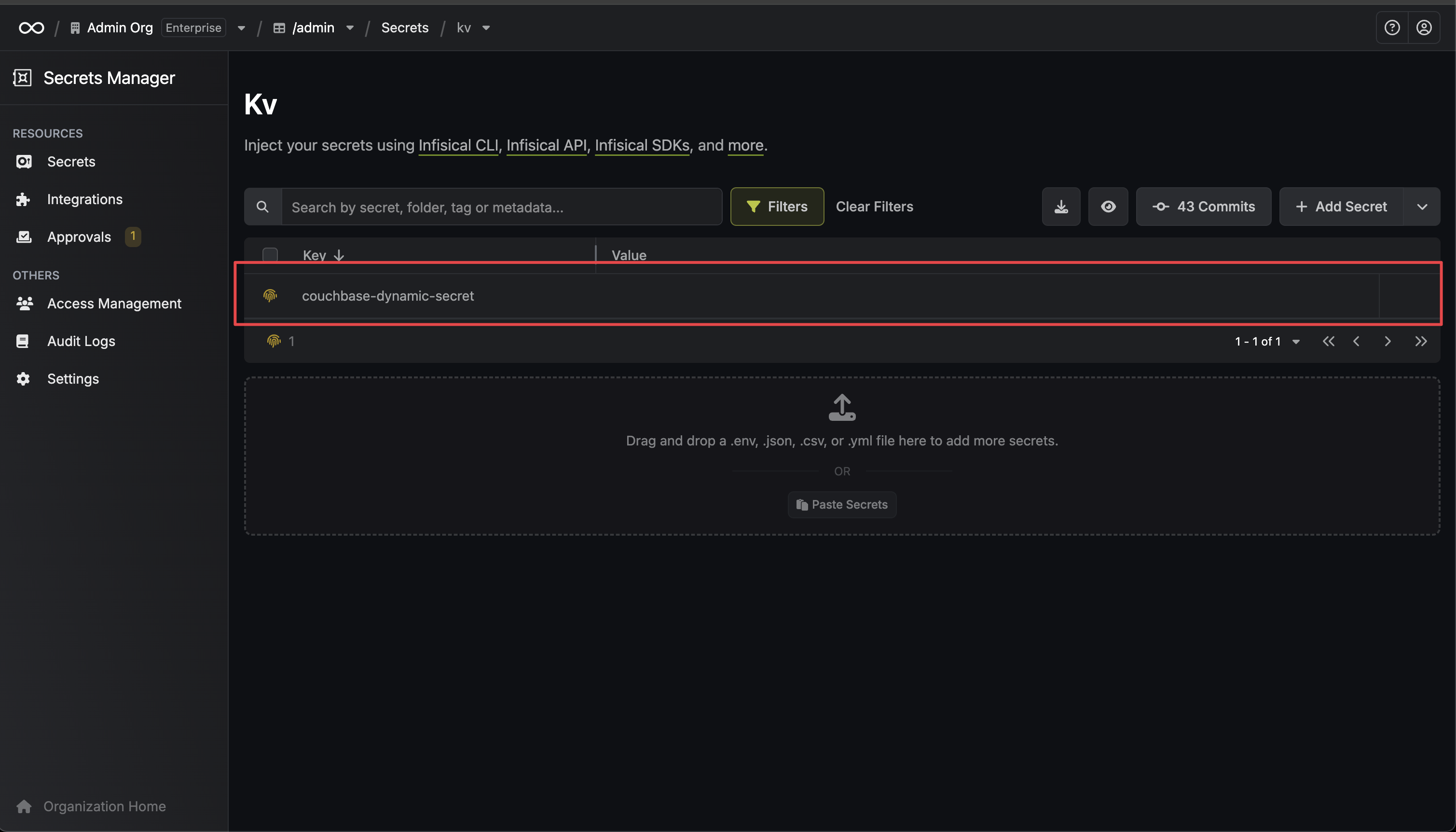 Once you've successfully configured the dynamic secret, you're ready to generate on-demand credentials.
To do this, simply click on the 'Generate' button which appears when hovering over the dynamic secret item.
Alternatively, you can initiate the creation of a new lease by selecting 'New Lease' from the dynamic secret lease list section.
Once you've successfully configured the dynamic secret, you're ready to generate on-demand credentials.
To do this, simply click on the 'Generate' button which appears when hovering over the dynamic secret item.
Alternatively, you can initiate the creation of a new lease by selecting 'New Lease' from the dynamic secret lease list section.
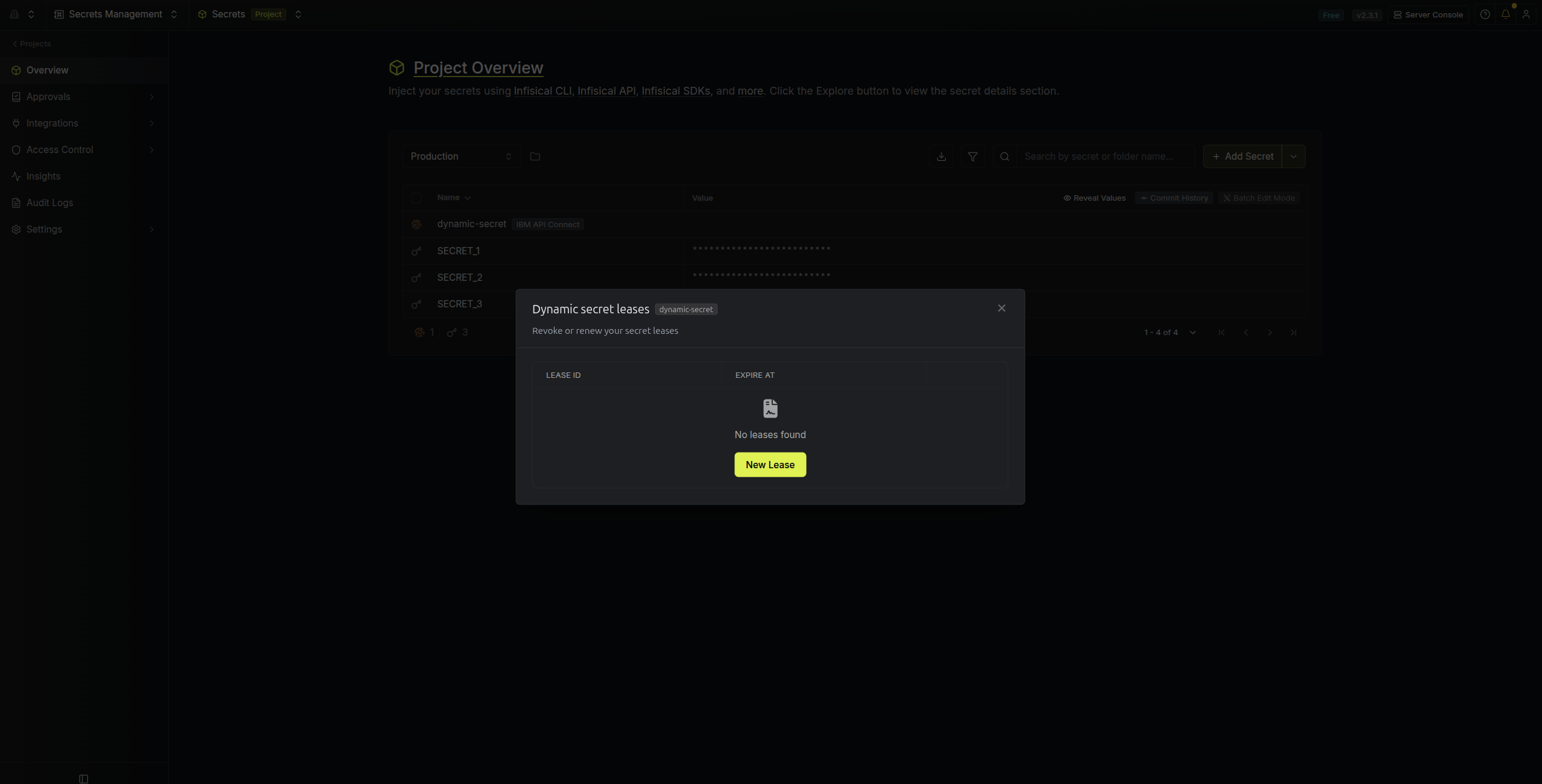 When generating these secrets, it's important to specify a Time-to-Live (TTL) duration. This will dictate how long the credentials are valid for.
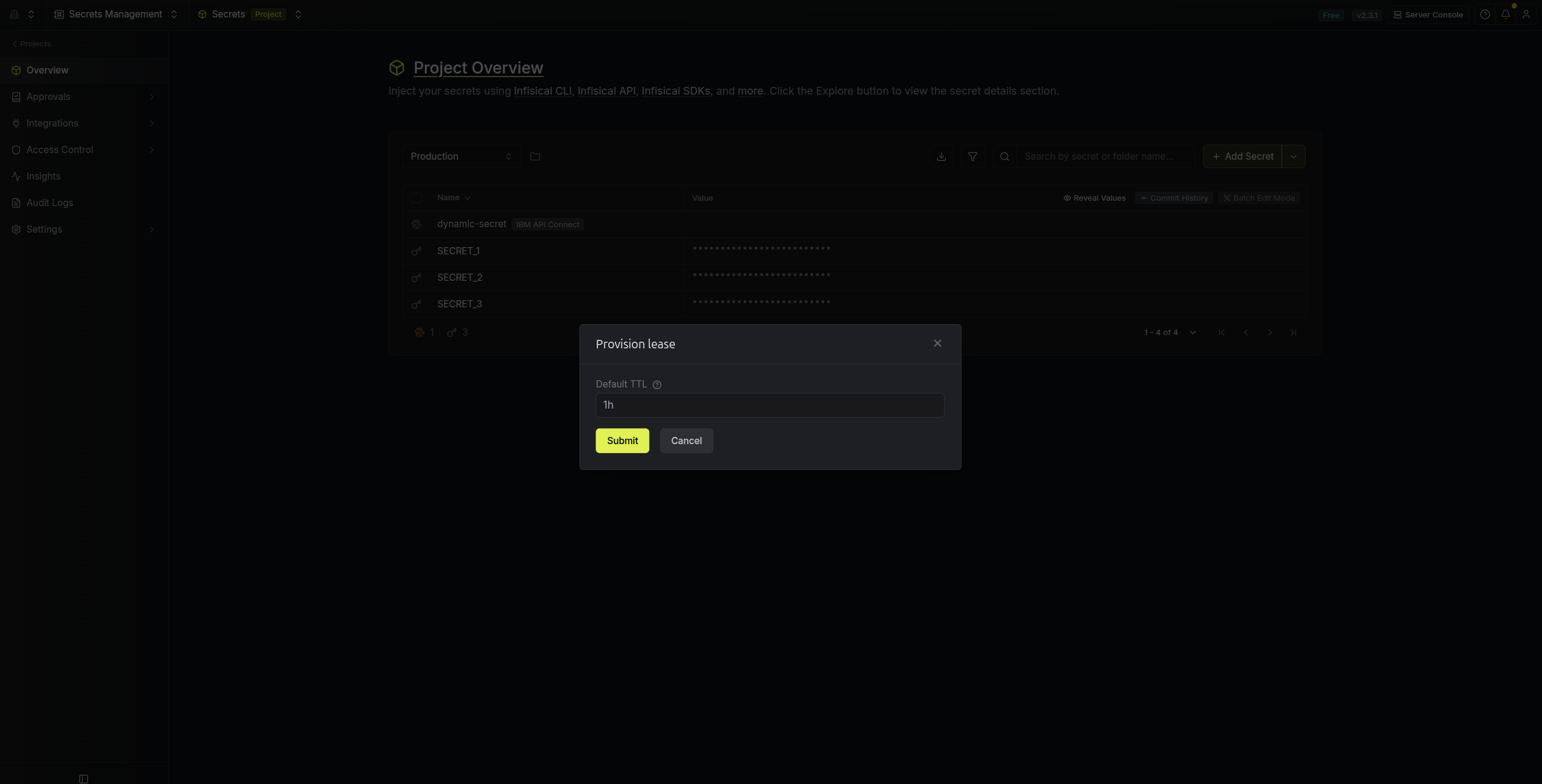 Ensure that the TTL for the lease falls within the maximum TTL defined when configuring the dynamic secret.
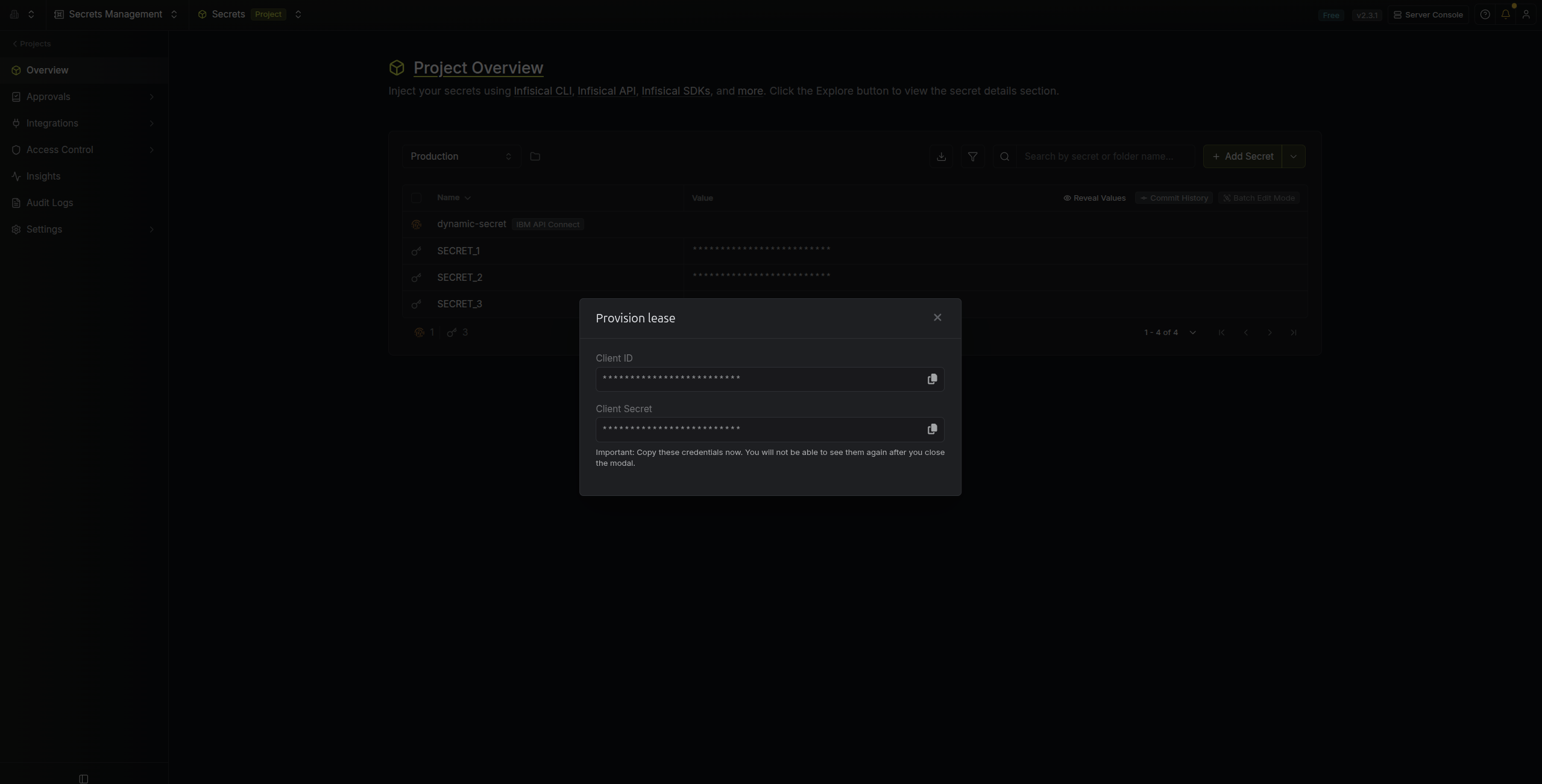
Once you click the `Submit` button, a new secret lease will be generated and the credentials for it will be shown to you.
Ensure that the TTL for the lease falls within the maximum TTL defined when configuring the dynamic secret.
Once you click the `Submit` button, a new secret lease will be generated and the credentials for it will be shown to you.
 ## Advanced Bucket Configuration Examples
The advanced bucket configuration allows you to specify granular access control:
### Example 1: Specific Bucket Access
```json theme={null}
[
{
"name": "travel-sample"
}
]
```
### Example 2: Bucket with Specific Scopes
```json theme={null}
[
{
"name": "travel-sample",
"scopes": [
{
"name": "inventory"
},
{
"name": "_default"
}
]
}
]
```
### Example 3: Bucket with Scopes and Collections
```json theme={null}
[
{
"name": "travel-sample",
"scopes": [
{
"name": "inventory",
"collections": ["airport", "airline"]
},
{
"name": "_default",
"collections": ["users"]
}
]
}
]
```
## Audit or Revoke Leases
Once you have created one or more leases, you will be able to access them by clicking on the respective dynamic secret item on the dashboard.
This will allow you to see the expiration time of the lease or delete a lease before its set time to live.
## Advanced Bucket Configuration Examples
The advanced bucket configuration allows you to specify granular access control:
### Example 1: Specific Bucket Access
```json theme={null}
[
{
"name": "travel-sample"
}
]
```
### Example 2: Bucket with Specific Scopes
```json theme={null}
[
{
"name": "travel-sample",
"scopes": [
{
"name": "inventory"
},
{
"name": "_default"
}
]
}
]
```
### Example 3: Bucket with Scopes and Collections
```json theme={null}
[
{
"name": "travel-sample",
"scopes": [
{
"name": "inventory",
"collections": ["airport", "airline"]
},
{
"name": "_default",
"collections": ["users"]
}
]
}
]
```
## Audit or Revoke Leases
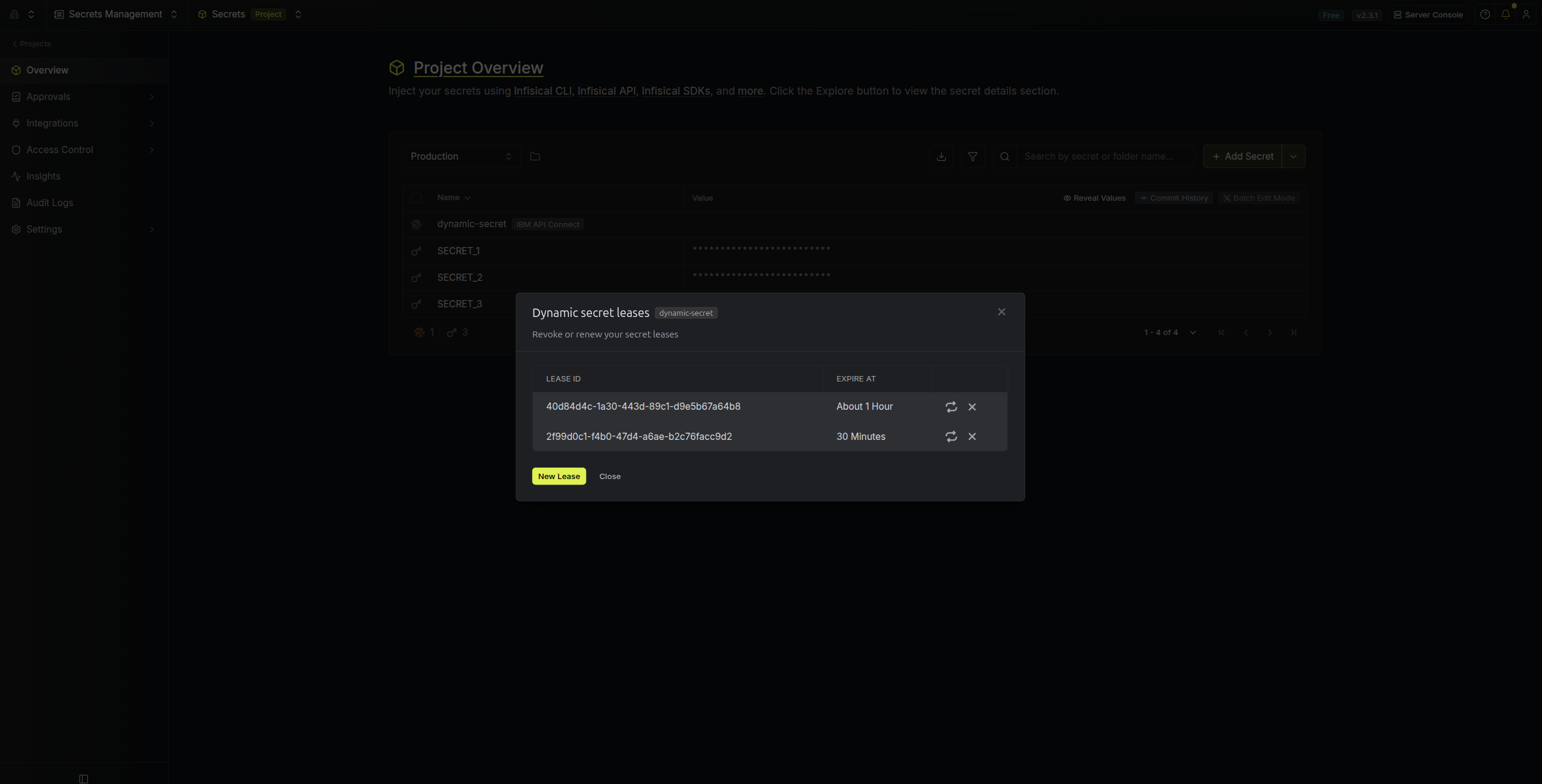
Once you have created one or more leases, you will be able to access them by clicking on the respective dynamic secret item on the dashboard.
This will allow you to see the expiration time of the lease or delete a lease before its set time to live.
 ## Renew Leases
To extend the life of the generated dynamic secret leases past its initial time to live, simply click on the **Renew** button as illustrated below.
## Renew Leases
To extend the life of the generated dynamic secret leases past its initial time to live, simply click on the **Renew** button as illustrated below.
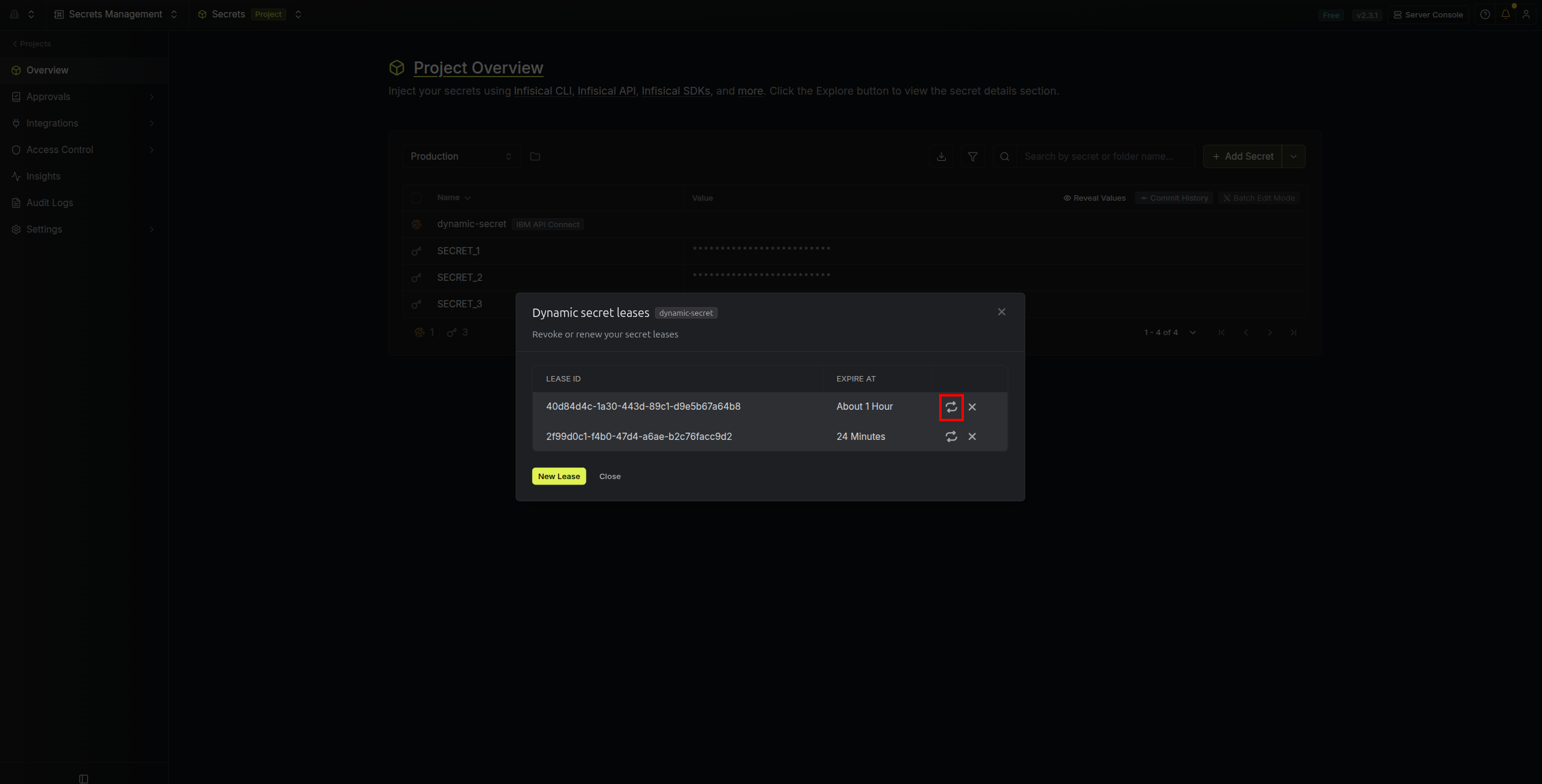 Lease renewals cannot exceed the maximum TTL set when configuring the dynamic secret
## Couchbase Roles and Permissions
The Couchbase dynamic secret integration supports the following database credential roles:
* **read**: Provides read-only access to bucket data
* **write**: Provides read and write access to bucket data
These roles are specifically for database credentials and are different from Couchbase's administrative roles. They provide data-level access to buckets, scopes, and collections based on your configuration.
## Troubleshooting
### Common Issues
1. **Invalid API Key**: Ensure your Couchbase Cloud API key has the necessary permissions to manage database users
2. **Invalid Organization/Project/Cluster IDs**: Verify that the provided IDs exist and are accessible with your API key
3. **Role Permission Errors**: Make sure you're using only the supported database credential roles (read, write)
4. **Bucket Access Issues**: Ensure the specified buckets exist in your cluster and are accessible
Lease renewals cannot exceed the maximum TTL set when configuring the dynamic secret
## Couchbase Roles and Permissions
The Couchbase dynamic secret integration supports the following database credential roles:
* **read**: Provides read-only access to bucket data
* **write**: Provides read and write access to bucket data
These roles are specifically for database credentials and are different from Couchbase's administrative roles. They provide data-level access to buckets, scopes, and collections based on your configuration.
## Troubleshooting
### Common Issues
1. **Invalid API Key**: Ensure your Couchbase Cloud API key has the necessary permissions to manage database users
2. **Invalid Organization/Project/Cluster IDs**: Verify that the provided IDs exist and are accessible with your API key
3. **Role Permission Errors**: Make sure you're using only the supported database credential roles (read, write)
4. **Bucket Access Issues**: Ensure the specified buckets exist in your cluster and are accessible