> ## Documentation Index
> Fetch the complete documentation index at: https://infisical-devin-1781641701-docs-github-pat-fine-grained.mintlify.site/llms.txt
> Use this file to discover all available pages before exploring further.
# Overview
> Track all actions performed within Infisical
Note that Audit Logs is a paid feature.
If you're using Infisical Cloud, then it is available under the **Pro**,
and **Enterprise Tier** with varying retention periods. If you're self-hosting Infisical,
then you should contact [sales@infisical.com](mailto:sales@infisical.com) to purchase an enterprise license to use it.
Infisical provides audit logs for security and compliance teams to monitor information access.
With the Audit Log functionality, teams can:
* **Track** 40+ different events;
* **Filter** audit logs by event, actor, specific user or identity, source, date or any combination of these filters;
* **Inspect** extensive metadata in the event of any suspicious activity or incident review.
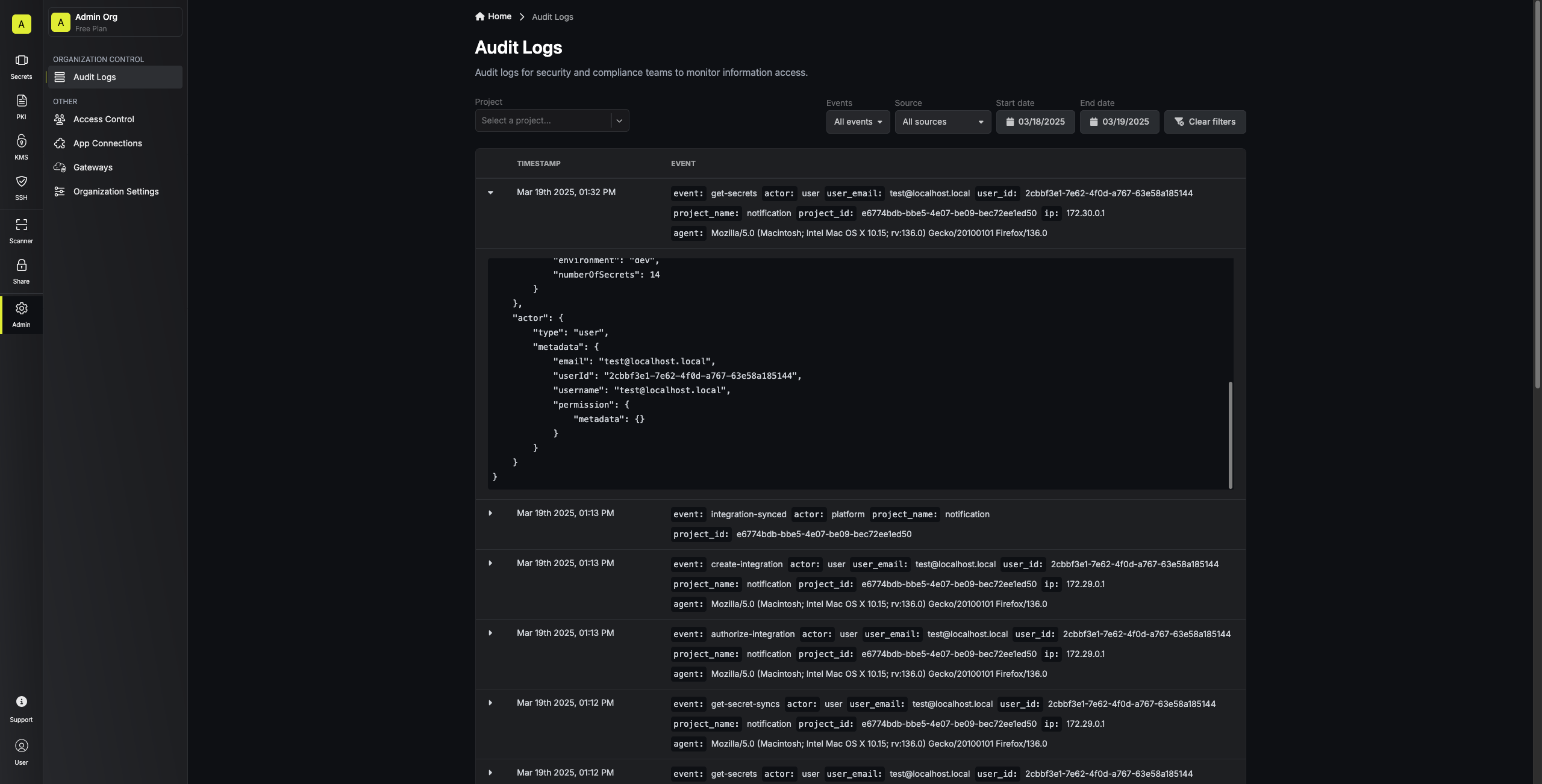 ## Audit Log Structure
Each log contains the following data:
| Field | Type | Description | Purpose |
| ------------------------- | -------- | --------------------------------------------------------- | ------------------------------------------------------------- |
| **event** | Object | Contains details about the action performed | Captures what happened |
| event.type | String | The specific action that occurred (e.g., "create-secret") | Identifies the exact operation |
| event.metadata | Object | Context-specific details about the event | Provides detailed information relevant to the specific action |
| **actor** | Object | Information about who performed the action | Identifies the responsible entity |
| actor.type | String | Category of actor (user, service, identity, etc.) | Distinguishes between human and non-human actors |
| actor.metadata | Object | Details about the specific actor | Provides identity information |
| actor.metadata.userId | String | Unique identifier for user actors | Links to specific user account |
| actor.metadata.email | String | Email address for user actors | Email of the executing user |
| actor.metadata.username | String | Username for user actors | Username of the executing user |
| actor.metadata.serviceId | String | Identifier for service actors | ID of specific service token |
| actor.metadata.identityId | String | Identifier for identity actors | ID to specific identity |
| actor.metadata.permission | Object | Permission context for the action | Shows permission template data when action was performed |
| **orgId** | String | Organization identifier | Indicates which organization the action occurred in |
| **projectId** | String | Project identifier | Indicates which project the action affected |
| **ipAddress** | String | Source IP address | Shows where the request originated from |
| **userAgent** | String | Client application information | Identifies browser or application used |
| **userAgentType** | String | Category of client (web, CLI, SDK, etc.) | Classifies the access method |
| **timestamp** | DateTime | When the action occurred | Records the exact time of the event |
```json theme={null}
{
"id": "[UUID]",
"ipAddress": "[IP_ADDRESS]",
"userAgent": "[USER_AGENT_STRING]",
"userAgentType": "web",
"expiresAt": "[TIMESTAMP]",
"createdAt": "[TIMESTAMP]",
"updatedAt": "[TIMESTAMP]",
"orgId": "[ORGANIZATION_UUID]",
"projectId": "[PROJECT_UUID]",
"event": {
"type": "get-secrets",
"metadata": {
"secretPath": "[PATH]",
"environment": "[ENVIRONMENT_NAME]",
"numberOfSecrets": [NUMBER]
}
},
"actor": {
"type": "user",
"metadata": {
"email": "[EMAIL]",
"userId": "[USER_UUID]",
"username": "[USERNAME]",
"permission": {
"metadata": {},
"auth": {}
}
}
}
}
```
**For high-volume self-hosted deployments:** If your audit log table is growing to hundreds of millions of rows, consider configuring [ClickHouse as your audit log storage backend](/documentation/platform/audit-logs-clickhouse-setup) to maintain query performance.
## Audit Log Structure
Each log contains the following data:
| Field | Type | Description | Purpose |
| ------------------------- | -------- | --------------------------------------------------------- | ------------------------------------------------------------- |
| **event** | Object | Contains details about the action performed | Captures what happened |
| event.type | String | The specific action that occurred (e.g., "create-secret") | Identifies the exact operation |
| event.metadata | Object | Context-specific details about the event | Provides detailed information relevant to the specific action |
| **actor** | Object | Information about who performed the action | Identifies the responsible entity |
| actor.type | String | Category of actor (user, service, identity, etc.) | Distinguishes between human and non-human actors |
| actor.metadata | Object | Details about the specific actor | Provides identity information |
| actor.metadata.userId | String | Unique identifier for user actors | Links to specific user account |
| actor.metadata.email | String | Email address for user actors | Email of the executing user |
| actor.metadata.username | String | Username for user actors | Username of the executing user |
| actor.metadata.serviceId | String | Identifier for service actors | ID of specific service token |
| actor.metadata.identityId | String | Identifier for identity actors | ID to specific identity |
| actor.metadata.permission | Object | Permission context for the action | Shows permission template data when action was performed |
| **orgId** | String | Organization identifier | Indicates which organization the action occurred in |
| **projectId** | String | Project identifier | Indicates which project the action affected |
| **ipAddress** | String | Source IP address | Shows where the request originated from |
| **userAgent** | String | Client application information | Identifies browser or application used |
| **userAgentType** | String | Category of client (web, CLI, SDK, etc.) | Classifies the access method |
| **timestamp** | DateTime | When the action occurred | Records the exact time of the event |
```json theme={null}
{
"id": "[UUID]",
"ipAddress": "[IP_ADDRESS]",
"userAgent": "[USER_AGENT_STRING]",
"userAgentType": "web",
"expiresAt": "[TIMESTAMP]",
"createdAt": "[TIMESTAMP]",
"updatedAt": "[TIMESTAMP]",
"orgId": "[ORGANIZATION_UUID]",
"projectId": "[PROJECT_UUID]",
"event": {
"type": "get-secrets",
"metadata": {
"secretPath": "[PATH]",
"environment": "[ENVIRONMENT_NAME]",
"numberOfSecrets": [NUMBER]
}
},
"actor": {
"type": "user",
"metadata": {
"email": "[EMAIL]",
"userId": "[USER_UUID]",
"username": "[USERNAME]",
"permission": {
"metadata": {},
"auth": {}
}
}
}
}
```
**For high-volume self-hosted deployments:** If your audit log table is growing to hundreds of millions of rows, consider configuring [ClickHouse as your audit log storage backend](/documentation/platform/audit-logs-clickhouse-setup) to maintain query performance.